LivePortrait、1枚の写真を自然に動かすための高性能AIアニメーションツール
概要
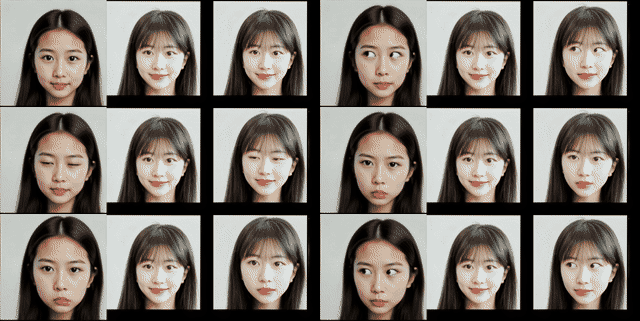
LivePortraitは「1枚の顔写真を、別の動画の動きに合わせて自然に動かす」ためのポートレートアニメーション技術で、静止画をまるで生きているかのように動かせるのが特徴です。
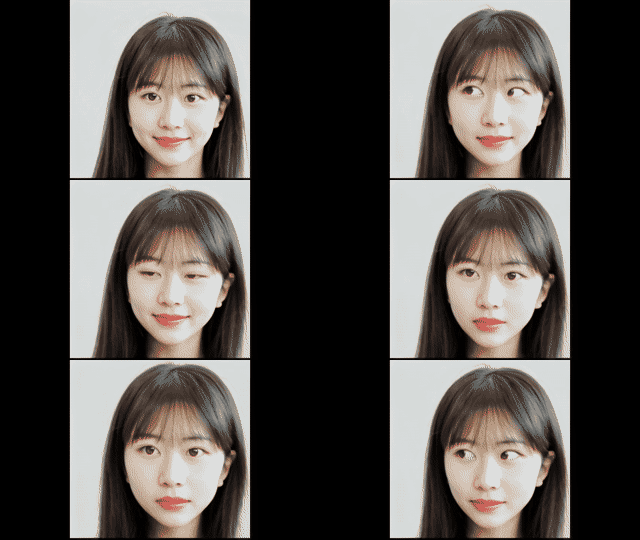
🧩 LivePortraitとは何をするソフト?
- 静止画の人物を動画のように動かす
目線・口の動き・表情・頭の向きなどを、別の「ドライビング動画」から抽出して適用します。 - 人間だけでなく、猫・犬などの動物にも対応
動物モデルも用意されており、ペットの写真を動かすこともできます。 - 高速で高品質
🎥 どうやって動かしているの?
主な仕組み
- 特徴抽出(Appearance Feature Extractor)
顔写真から3D的な特徴を抽出。 - 動き抽出(Motion Extractor)
ドライビング動画から表情や頭の動きを解析。 - ワーピング(Warping Module)
抽出した動きに合わせて元画像を自然に変形。 - 生成(SPADE Generator)
最終的なフレームを高品質に生成。 - ステッチング & リターゲティング
動きの破綻を防ぎ、より自然な表情や目線を再現。
⭐ LivePortraitの強み
- 自然な表情変化
目線や口の開閉など細かい動きも再現。 - 高速処理
動画生成が非常に速い。 - 幅広いスタイルに対応
写実的な写真だけでなく、イラスト・油絵・3D風なども動かせる。 - 動物にも対応
猫・犬・パンダなども動かせる。
🛠️ インストール(簡単)
(Windows向けのワンクリック版も提供されています)
LivePortrait-Windows-v20240829.zip · cleardusk/LivePortrait-Windows at main
update.bat動物版を使う場合
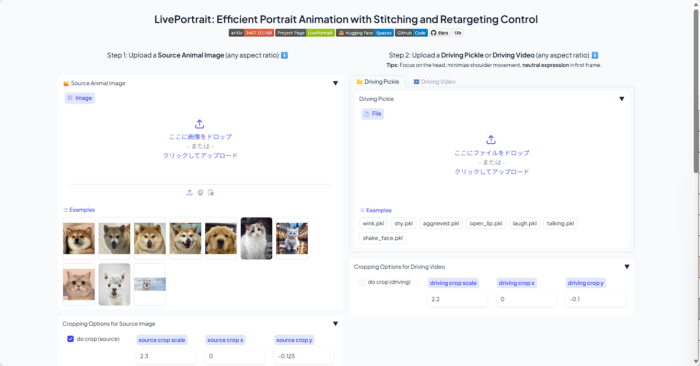
仮想環境
@echo off
setlocal

:: Attempt to activate the LivePortrait environment and capture any error messages in a file
echo Activating the LivePortrait environment...
call LivePortrait_env\Scripts\activate > nul 2>env_error.txt

:: Check the exit status of the previous command to see if the activation was successful
if %ERRORLEVEL% NEQ 0 (
    echo Activation failed. Displaying the error message:
    type env_error.txt
    echo Press any key to exit...
    pause >nul
    goto :eof
) else (
    echo Environment activated successfully.
)

::python inference.py
::
python inference_animals.py
::python app.py
::python app_animals.py

goto :skip_venv
:skip_cmd
::
:skip_venv
::
cmd.exe /k
 timeout /t 55
LivePortrait-Windows\pretrained_weights\liveportrait_animals\base_models_v1.1追加
動物版を使う場合にはtorch.load(model_checkpoint_path, map_location=lambda storage, loc: storage, weights_only=False)のエラー出るのでバージョン上げます
pip show torch
Version: 1.10.1+cu111

nvcc -V
pip3 uninstall torch torchvision
pip3 install torch torchvision --index-url https://download.pytorch.org/whl/cu128
MultiScaleDeformableAttention_がうまく動かないのでインストールする
Ninja, a small build system with a focus on speed
https://visualstudio.microsoft.com/ja/visual-cpp-build-tools
https://developer.nvidia.com/cuda/toolkit
E:\WPy64-31241\content\LivePortrait\src\utils\dependencies\XPose\models\UniPose\opsを深くないフォルダーの階層にコピー する
"C:\Program Files (x86)\Microsoft Visual Studio\2022\BuildTools\VC\Auxiliary\Build\vcvars64.bat"
set DISTUTILS_USE_SDK=1

cd ops
python setup.py build install
python setup.py sdist bdist_wheel
mingw64使う場合
WinLibs – GCC+MinGW-w64 compiler for Windows
ninja使わない場合
cmdclass={"build_ext": torch.utils.cpp_extension.BuildExtension.with_options(use_ninja=False)
“E:\LivePortrait-Windows\LivePortrait_env\include\pycapsule.h"がない場合はダウンロードしてセットします
https://www.python.org/ftp/python/3.9.16/Python-3.9.16.tar.xz
Pythonパッケージをwhlファイルを使ってインストールする
pip3 install MultiScaleDeformableAttention-1.0-cp39-cp39-win_amd64.whl
pip3 install MultiScaleDeformableAttention-1.0-cp312-cp312-win_amd64.whl🚀 インストール方法(Windows / macOS / Linux 共通)
1. 必要なソフトを準備
- Python 3.9〜
- Git
- NVIDIA GPU(推奨)
- CUDA + cuDNN(GPU使用時)
CPUでも動くけど、GPUがあると圧倒的に速い。
2. LivePortrait をダウンロード
it clone https://github.com/Klingai/LivePortrait.git
cd LivePortrait
3. Python環境を作成(推奨)
python -m venv venv
source lp_env/bin/activate   # Windowsは venv\Scripts\activate
4. 必要なライブラリをインストール
pip install -r requirements.txt
5. 学習済みモデル(pretrained_weights)をダウンロード
https://huggingface.co/KlingTeam/LivePortrait
GitHubの pretrained_weights リンクから取得して、
LivePortrait フォルダ内の pretrained_weights / に配置する。
hf download KlingTeam/LivePortrait --local-dir pretrained_weights
必要なモデル例:
appearance_feature_extractor.pthmotion_extractor.pthwarping_module.pthgenerator.pth
🎬 使い方(Web)
run_windows_human.bat
動物はこちら
run_windows_animal.bat
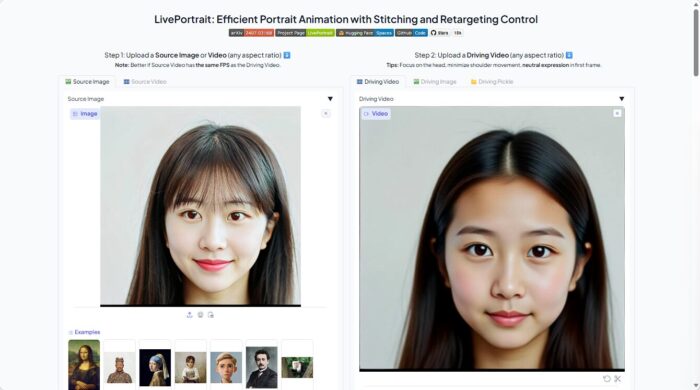
1枚の画像(source) と 動きの動画(driving video) を入力
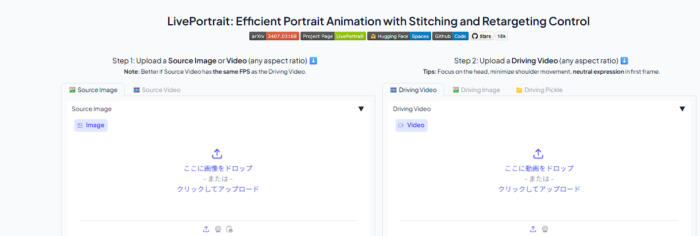
読み込んだ後

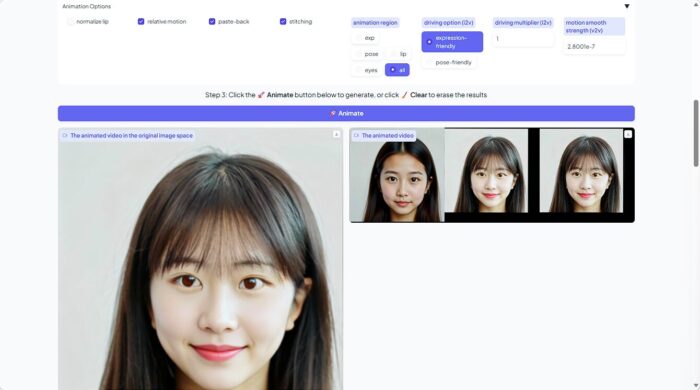
animate押して作成
🎬 使い方(基本)コマンドライン
LivePortraitは 1枚の画像(source) と 動きの動画(driving video) を入力すると、
「画像が動画の動きを真似するアニメーション」を生成する。
1. 画像と動画を用意
source.jpg(動かしたい顔写真)driving.mp4(動きを抽出する動画)
2. コマンドで実行
python inference.py -s source.jpg -d driving.mp4 -o output.mp4
主なオプション
| オプション | 内容 |
|---|---|
-s | 静止画(source image) |
-d | 動きの動画(driving video) |
-o | 出力ファイル名 |
--crop | 顔の自動クロップ |
--enhance | 画質向上 |
OPTIONS
usage: inference_animals.py [-h] [OPTIONS]

╭─ options ────────────────────────────────────────────────────────────────────╮
│ -h, --help                                                                   │
│       show this help message and exit                                        │
│ -s STR, --source STR                                                         │
│       path to the source portrait (human/animal) or video (human) (default:  │
│       'E:\WPy64-31241\content\LivePortrait\src\config\../../assets/examples/ │
│       source/s0.jpg')                                                        │
│ -d STR, --driving STR                                                        │
│       path to driving video or template (.pkl format) (default: 'E:\WPy64-31 │
│       241\content\LivePortrait\src\config\../../assets/examples/driving/d0.m │
│       p4')                                                                   │
│ -o STR, --output-dir STR                                                     │
│       directory to save output video (default: animations/)                  │
│ --flag-use-half-precision, --no-flag-use-half-precision                      │
│       whether to use half precision (FP16). If black boxes appear, it might  │
│       be due to GPU incompatibility; set to False. (default: True)           │
│ --flag-crop-driving-video, --no-flag-crop-driving-video                      │
│       whether to crop the driving video, if the given driving info is a      │
│       video (default: False)                                                 │
│ --device-id INT                                                              │
│       gpu device id (default: 0)                                             │
│ --flag-force-cpu, --no-flag-force-cpu                                        │
│       force cpu inference, WIP! (default: False)                             │
│ --flag-normalize-lip, --no-flag-normalize-lip                                │
│       whether to let the lip to close state before animation, only take      │
│       effect when flag_eye_retargeting and flag_lip_retargeting is False     │
│       (default: False)                                                       │
│ --flag-source-video-eye-retargeting, --no-flag-source-video-eye-retargeting  │
│       when the input is a source video, whether to let the eye-open scalar   │
│       of each frame to be the same as the first source frame before the      │
│       animation, only take effect when flag_eye_retargeting and              │
│       flag_lip_retargeting is False, may cause the inter-frame jittering     │
│       (default: False)                                                       │
│ --flag-eye-retargeting, --no-flag-eye-retargeting                            │
│       not recommend to be True, WIP; whether to transfer the eyes-open ratio │
│       of each driving frame to the source image or the corresponding source  │
│       frame (default: False)                                                 │
│ --flag-lip-retargeting, --no-flag-lip-retargeting                            │
│       not recommend to be True, WIP; whether to transfer the lip-open ratio  │
│       of each driving frame to the source image or the corresponding source  │
│       frame (default: False)                                                 │
│ --flag-stitching, --no-flag-stitching                                        │
│       recommend to True if head movement is small, False if head movement is │
│       large or the source image is an animal (default: True)                 │
│ --flag-relative-motion, --no-flag-relative-motion                            │
│       whether to use relative motion (default: True)                         │
│ --flag-pasteback, --no-flag-pasteback                                        │
│       whether to paste-back/stitch the animated face cropping from the       │
│       face-cropping space to the original image space (default: True)        │
│ --flag-do-crop, --no-flag-do-crop                                            │
│       whether to crop the source portrait or video to the face-cropping      │
│       space (default: True)                                                  │
│ --driving-option {expression-friendly,pose-friendly}                         │
│       "expression-friendly" or "pose-friendly"; "expression-friendly" would  │
│       adapt the driving motion with the global multiplier, and could be used │
│       when the source is a human image (default: expression-friendly)        │
│ --driving-multiplier FLOAT                                                   │
│       be used only when driving_option is "expression-friendly" (default:    │
│       1.0)                                                                   │
│ --driving-smooth-observation-variance FLOAT                                  │
│       smooth strength scalar for the animated video when the input is a      │
│       source video, the larger the number, the smoother the animated video;  │
│       too much smoothness would result in loss of motion accuracy (default:  │
│       3e-07)                                                                 │
│ --audio-priority {source,driving}                                            │
│       whether to use the audio from source or driving video (default:        │
│       driving)                                                               │
│ --animation-region {exp,pose,lip,eyes,all}                                   │
│       the region where the animation was performed, "exp" means the          │
│       expression, "pose" means the head pose, "all" means all regions        │
│       (default: all)                                                         │
│ --det-thresh FLOAT                                                           │
│       detection threshold (default: 0.15)                                    │
│ --scale FLOAT                                                                │
│       the ratio of face area is smaller if scale is larger (default: 2.3)    │
│ --vx-ratio FLOAT                                                             │
│       the ratio to move the face to left or right in cropping space          │
│       (default: 0)                                                           │
│ --vy-ratio FLOAT                                                             │
│       the ratio to move the face to up or down in cropping space (default:   │
│       -0.125)                                                                │
│ --flag-do-rot, --no-flag-do-rot                                              │
│       whether to conduct the rotation when flag_do_crop is True (default:    │
│       True)                                                                  │
│ --source-max-dim INT                                                         │
│       the max dim of height and width of source image or video, you can      │
│       change it to a larger number, e.g., 1920 (default: 1280)               │
│ --source-division INT                                                        │
│       make sure the height and width of source image or video can be divided │
│       by this number (default: 2)                                            │
│ --scale-crop-driving-video FLOAT                                             │
│       scale factor for cropping driving video (default: 2.2)                 │
│ --vx-ratio-crop-driving-video FLOAT                                          │
│       adjust y offset (default: 0.0)                                         │
│ --vy-ratio-crop-driving-video FLOAT                                          │
│       adjust x offset (default: -0.1)                                        │
│ -p INT, --server-port INT                                                    │
│       port for gradio server (default: 8890)                                 │
│ --share, --no-share                                                          │
│       whether to share the server to public (default: False)                 │
│ --server-name {None}|STR                                                     │
│       set the local server name, "0.0.0.0" to broadcast all (default:        │
│       127.0.0.1)                                                             │
│ --flag-do-torch-compile, --no-flag-do-torch-compile                          │
│       whether to use torch.compile to accelerate generation (default: False) │
│ --gradio-temp-dir {None}|STR                                                 │
│       directory to save gradio temp files (default: None)                    │
╰──────────────────────────────────────────────────────────────────────────────╯
OPTIONS
usage: app.py [-h] [OPTIONS]

╭─ options ────────────────────────────────────────────────────────────────────╮
│ -h, --help                                                                   │
│       show this help message and exit                                        │
│ -s STR, --source STR                                                         │
│       path to the source portrait (human/animal) or video (human) (default:  │
│       'E:\WPy64-31241\content\LivePortrait\src\config\../../assets/examples/ │
│       source/s0.jpg')                                                        │
│ -d STR, --driving STR                                                        │
│       path to driving video or template (.pkl format) (default: 'E:\WPy64-31 │
│       241\content\LivePortrait\src\config\../../assets/examples/driving/d0.m │
│       p4')                                                                   │
│ -o STR, --output-dir STR                                                     │
│       directory to save output video (default: animations/)                  │
│ --flag-use-half-precision, --no-flag-use-half-precision                      │
│       whether to use half precision (FP16). If black boxes appear, it might  │
│       be due to GPU incompatibility; set to False. (default: True)           │
│ --flag-crop-driving-video, --no-flag-crop-driving-video                      │
│       whether to crop the driving video, if the given driving info is a      │
│       video (default: False)                                                 │
│ --device-id INT                                                              │
│       gpu device id (default: 0)                                             │
│ --flag-force-cpu, --no-flag-force-cpu                                        │
│       force cpu inference, WIP! (default: False)                             │
│ --flag-normalize-lip, --no-flag-normalize-lip                                │
│       whether to let the lip to close state before animation, only take      │
│       effect when flag_eye_retargeting and flag_lip_retargeting is False     │
│       (default: False)                                                       │
│ --flag-source-video-eye-retargeting, --no-flag-source-video-eye-retargeting  │
│       when the input is a source video, whether to let the eye-open scalar   │
│       of each frame to be the same as the first source frame before the      │
│       animation, only take effect when flag_eye_retargeting and              │
│       flag_lip_retargeting is False, may cause the inter-frame jittering     │
│       (default: False)                                                       │
│ --flag-eye-retargeting, --no-flag-eye-retargeting                            │
│       not recommend to be True, WIP; whether to transfer the eyes-open ratio │
│       of each driving frame to the source image or the corresponding source  │
│       frame (default: False)                                                 │
│ --flag-lip-retargeting, --no-flag-lip-retargeting                            │
│       not recommend to be True, WIP; whether to transfer the lip-open ratio  │
│       of each driving frame to the source image or the corresponding source  │
│       frame (default: False)                                                 │
│ --flag-stitching, --no-flag-stitching                                        │
│       recommend to True if head movement is small, False if head movement is │
│       large or the source image is an animal (default: True)                 │
│ --flag-relative-motion, --no-flag-relative-motion                            │
│       whether to use relative motion (default: True)                         │
│ --flag-pasteback, --no-flag-pasteback                                        │
│       whether to paste-back/stitch the animated face cropping from the       │
│       face-cropping space to the original image space (default: True)        │
│ --flag-do-crop, --no-flag-do-crop                                            │
│       whether to crop the source portrait or video to the face-cropping      │
│       space (default: True)                                                  │
│ --driving-option {expression-friendly,pose-friendly}                         │
│       "expression-friendly" or "pose-friendly"; "expression-friendly" would  │
│       adapt the driving motion with the global multiplier, and could be used │
│       when the source is a human image (default: expression-friendly)        │
│ --driving-multiplier FLOAT                                                   │
│       be used only when driving_option is "expression-friendly" (default:    │
│       1.0)                                                                   │
│ --driving-smooth-observation-variance FLOAT                                  │
│       smooth strength scalar for the animated video when the input is a      │
│       source video, the larger the number, the smoother the animated video;  │
│       too much smoothness would result in loss of motion accuracy (default:  │
│       3e-07)                                                                 │
│ --audio-priority {source,driving}                                            │
│       whether to use the audio from source or driving video (default:        │
│       driving)                                                               │
│ --animation-region {exp,pose,lip,eyes,all}                                   │
│       the region where the animation was performed, "exp" means the          │
│       expression, "pose" means the head pose, "all" means all regions        │
│       (default: all)                                                         │
│ --det-thresh FLOAT                                                           │
│       detection threshold (default: 0.15)                                    │
│ --scale FLOAT                                                                │
│       the ratio of face area is smaller if scale is larger (default: 2.3)    │
│ --vx-ratio FLOAT                                                             │
│       the ratio to move the face to left or right in cropping space          │
│       (default: 0)                                                           │
│ --vy-ratio FLOAT                                                             │
│       the ratio to move the face to up or down in cropping space (default:   │
│       -0.125)                                                                │
│ --flag-do-rot, --no-flag-do-rot                                              │
│       whether to conduct the rotation when flag_do_crop is True (default:    │
│       True)                                                                  │
│ --source-max-dim INT                                                         │
│       the max dim of height and width of source image or video, you can      │
│       change it to a larger number, e.g., 1920 (default: 1280)               │
│ --source-division INT                                                        │
│       make sure the height and width of source image or video can be divided │
│       by this number (default: 2)                                            │
│ --scale-crop-driving-video FLOAT                                             │
│       scale factor for cropping driving video (default: 2.2)                 │
│ --vx-ratio-crop-driving-video FLOAT                                          │
│       adjust y offset (default: 0.0)                                         │
│ --vy-ratio-crop-driving-video FLOAT                                          │
│       adjust x offset (default: -0.1)                                        │
│ -p INT, --server-port INT                                                    │
│       port for gradio server (default: 8890)                                 │
│ --share, --no-share                                                          │
│       whether to share the server to public (default: False)                 │
│ --server-name {None}|STR                                                     │
│       set the local server name, "0.0.0.0" to broadcast all (default:        │
│       127.0.0.1)                                                             │
│ --flag-do-torch-compile, --no-flag-do-torch-compile                          │
│       whether to use torch.compile to accelerate generation (default: False) │
│ --gradio-temp-dir {None}|STR                                                 │
│       directory to save gradio temp files (default: None)                    │
╰──────────────────────────────────────────────────────────────────────────────╯
🐱 動物モード(猫・犬など)
LivePortraitは動物にも対応している。
python inference_animals.py -s cat.jpg -d driving.mp4 -o output.mp4
対応例:
catdogpanda
🎞️ 出力結果
生成された動画は output/ フォルダに保存される。
フレーム単位の画像も同時に保存可能。
インストールと起動用のバッチファイル
動物版も対応しています コマンドライン や Web 版は自由に切り替えてください
@echo off
call %~dp0\scripts\env_for_icons.bat  %*
SET PATH=%PATH%;%WINPYDIRBASE%\PortableGit;%WINPYDIRBASE%\PortableGit\bin
SET PATH=%PATH%;%WINPYDIRBASE%\ffmpeg\bin
SET PATH=%PATH%;D:\winlibs\mingw64\bin
If not exist %WINPYDIRBASE%\content mkdir  %WINPYDIRBASE%\content

set HF_HOME=E:\my_cache\hf_home
set TRANSFORMERS_CACHE=E:\my_cache\transformers
set DIFFUSERS_CACHE=E:\my_cache\diffusers
echo HF_HOME = %HF_HOME%
echo TRANSFORMERS_CACHE = %TRANSFORMERS_CACHE%
echo DIFFUSERS_CACHE = %DIFFUSERS_CACHE%


set APP_NAME=LivePortrait
set APP_DIR=%WINPYDIRBASE%\content\%APP_NAME%
echo %APP_DIR%
cd %WINPYDIRBASE%\content\

If not exist  %APP_DIR% git clone https://github.com/KlingTeam/LivePortrait


cd %APP_DIR%
if not defined VENV_DIR (set "VENV_DIR=%APP_DIR%\venv")
if EXIST %VENV_DIR% goto :activate_venv

::python.exe -m venv "%VENV_DIR%"
python.exe -m venv "%VENV_DIR%" --system-site-packages
if %ERRORLEVEL% == 0 goto :pip
echo Unable to create venv
goto :skip_venv

:pip
call "%VENV_DIR%\Scripts\activate"
pip install -r requirements.txt
pip install tyro
pip install onnx
pip install onnxruntime-gpu
pip install gradio
pip install pykalman
pip install "huggingface_hub[cli]"

hf download KlingTeam/LivePortrait --local-dir pretrained_weights

"C:\Program Files (x86)\Microsoft Visual Studio\2022\BuildTools\VC\Auxiliary\Build\vcvars64.bat"
set DISTUTILS_USE_SDK=1
xcopy %APP_DIR%\src\utils\dependencies\XPose\models\UniPose\ops %APP_DIR%\ops\ /s /e

cd %APP_DIR%\ops
python setup.py build install
python setup.py sdist bdist_wheel
cmd.exe /k

:activate_venv
call "%VENV_DIR%\Scripts\activate"
::python inference.py
::
python inference_animals.py
::python app.py
::python app_animals.py

goto :skip_venv
:skip_cmd
::choco install ninja
:skip_venv
::
cmd.exe /k
 timeout /t 55