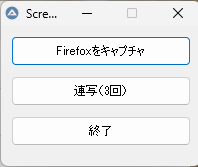
AutoItを使用してボタンを押すと指定されたウィンドウのスクリーンショットをキャプチャします。
プログラム
Global $saveFolder = "C:\app\FirefoxPortable\Screenshots"
#include <GUIConstantsEx.au3>
#include <ScreenCapture.au3>
#include <MsgBoxConstants.au3>
#include <WinAPI.au3>
#include <WinAPISys.au3>

; Firefox ウィンドウのクラス名
Global $windowTitle = "[CLASS:MozillaWindowClass]"

; 保存先フォルダ
Global $saveFolder = "C:\app\FirefoxPortable\Screenshots"

; 画面サイズを取得して右上に配置
Local $screenWidth = @DesktopWidth
Local $guiWidth = 200
Local $guiHeight = 140
Local $guiX = $screenWidth - $guiWidth
Local $guiY = 0

; GUI 作成(右上に配置)
GUICreate("Screenshots", $guiWidth, $guiHeight, $guiX, $guiY)
$btnCapture = GUICtrlCreateButton("Firefoxをキャプチャ", 10, 10, 180, 30)
$btnBurst = GUICtrlCreateButton("連写(3回)", 10, 50, 180, 30)
$btnExit = GUICtrlCreateButton("終了", 10, 90, 180, 30)
GUISetState()
WinSetOnTop("Screenshots", "", 1)

While 1
    Switch GUIGetMsg()
        Case $GUI_EVENT_CLOSE, $btnExit
            Exit
        Case $btnCapture
            CaptureFirefoxWindow()
        Case $btnBurst
            BurstCapture()
    EndSwitch
WEnd

Func CaptureFirefoxWindow()
    Local $hWnd = WinGetHandle($windowTitle)
    If Not @error And $hWnd <> 0 Then
        WinActivate($hWnd)
        WinWaitActive($hWnd)

        DirCreate($saveFolder)

        Local $timestamp = @YEAR & @MON & @MDAY & "_" & @HOUR & @MIN & @SEC
        Local $filename = $saveFolder & "\screenshot_" & $timestamp & ".png"

        Local $hBmp = _ScreenCapture_CaptureWnd("", $hWnd)
        _ScreenCapture_SaveImage($filename, $hBmp)

        TrayTip("保存完了", "保存先:" & @CRLF & $filename, 3)
    Else
        MsgBox($MB_ICONERROR, "エラー", "Firefox ウィンドウが見つかりません。")
    EndIf
EndFunc

Func BurstCapture()
    For $i = 1 To 3
        CaptureFirefoxWindow()
        Sleep(2000)
    Next
EndFunc
Firefoxのウィンドウを対象にしていますがアプリ変えて使ってください
保存フォルダーやスクショを連写するタイミングは変えてください