Deep-Live-Cam ディープフェイク動画や画像の作成ができるローカルPC上で学習なしで高品質な顔入れ替えに特化したソフトウェア
Deep‑Live‑Cam とは?
1枚の顔写真だけで、動画・画像・Webカメラの顔を別人に入れ替えるソフト。
リアルタイム処理が得意で、配信・動画編集・遊び用途まで幅広く使える。
- リアルタイムで顔を入れ替え
- 動画の顔を別人に差し替え
- 写真の顔を入れ替え
- 複数人の顔を同時に入れ替え
- 口の動きだけ元の人物にする(Mouth Mask)
初心者は「顔を入れ替えるソフト」と覚えればOK。
技術者は「InsightFaceベースの高速フェイススワップ」と理解すればOK。
技術者向け:内部技術のポイント
● InsightFace(inswapper)ベース
高精度な顔交換モデル。
顔の特徴抽出 → 顔領域の合成 → 色合わせ → ブレンドまで自動。
InsightFaceモデル(inswapperを含む)は、非営利な研究目的のみの使用を制限するライセンスの下で配布されています。Deep-Live-Camを使用する際は、このライセンスを遵守する必要があります。
● ONNX Runtime による高速推論
GPU / CPU / Apple Silicon / DirectML / OpenVINO に対応。
環境に合わせて最適な推論バックエンドを選べる。
● GFPGAN による顔補正
顔のディテールを復元して、より自然な仕上がりに。
● Face Mapping(複数人対応)
動画内の複数人物を検出し、
それぞれに別の顔を割り当てられる。
● Mouth Mask
口の動きだけ元の人物を残すことで、
リップシンクが自然になる。
初心者向け:何ができるの?
✔ 1. カメラ映像の顔をリアルタイムで入れ替え
配信者・VTuber的な使い方ができる。
✔ 2. 動画の顔を入れ替える
映画の主人公の顔を自分にする、など。
✔ 3. 写真の顔を入れ替える
SNS用の画像加工にも使える。
✔ 4. 複数人の顔を同時に入れ替え
グループ動画でもOK。
✔ 5. 口だけ元の人物にする
自然な口パクになる。
インストール
1. プラットフォームの設置
- Python(3.11推奨)
- PIP
- git
- FFMPEG
- Visual Studio 2022 Runtimes (Windows)
2. リポジトリのクローン
git clone https://github.com/hacksider/Deep-Live-Cam.git
cd Deep-Live-Cam
3. モデルをダウンロードする
これらのファイルを「models」フォルダに入れてください。
4. 依存関係のインストール
問題を避けるためにvenvの使用を強くお勧めします。
Windows用:
python -m venv venv
venv\Scripts\activate
pip install -r requirements.txt
GPUアクセラレーション
CUDA実行プロバイダー(Nvidia)
- CUDA Toolkit 12.8.0 をインストールする
- CUDA 12.x用のcuDNN v8.9.7をインストールする(onnxruntime-GPUに必須):
- CUDA 12.x用にcuDNN v8.9.7をダウンロードしてください
- cuDNNのbinディレクトリがシステムのPATHにあることを確認してください
- 依存関係のインストール:
pip install -U torch torchvision torchaudio --index-url https://download.pytorch.org/whl/cu128
pip uninstall onnxruntime onnxruntime-gpu
pip install onnxruntime-gpu==1.21.0
インストーラーを使ってインストールすることもできます ただし費用がかかります
使い方(GUI)
python run.py --execution-provider cuda
● 動画の顔を入れ替える
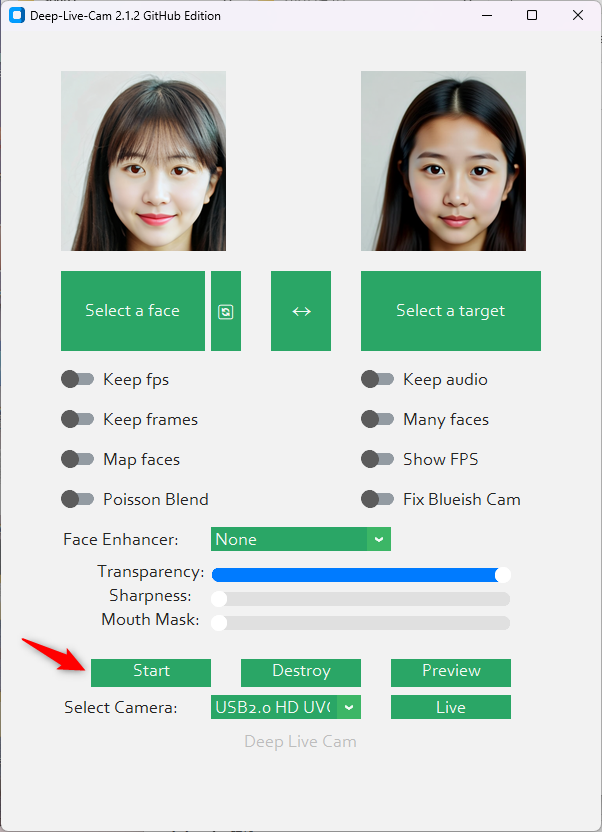
- Deep‑Live‑Cam を起動
- Source(入れ替えたい顔)を選ぶ
- Target(動画)を選ぶ
- Start を押す
- 完成
● カメラでリアルタイム使用
- 起動
- 顔写真を選ぶ
- Live を押す
- 数秒でプレビューが出る
セーフティ(初心者も重要)
Deep‑Live‑Cam は強力なので、
実在人物の顔を勝手に使うのはNG。
- 著名人の顔 → 許可が必要
- 他人の顔 → トラブルの原因
- 公開配信 → 特に注意
安全に使うのが大事。
まとめ(初心者+技術者向け)
Deep‑Live‑Cam は…
- 初心者:顔を入れ替えるだけで楽しめる
- 技術者:InsightFace + ONNX Runtime の高速フェイススワップ環境
- 配信者:リアルタイムで顔を変えられる
- 動画編集者:高品質なフェイススワップ動画を作れる
LivePortrait が「動きの転写」なのに対し、
Deep‑Live‑Cam は 顔そのものを別人に置き換える ソフト。
Deep-Live-Camインストールと起動用バッチファイル
https://github.com/hacksider/Deep-Live-Cam
@echo off
call %~dp0\scripts\env_for_icons.bat  %*
SET PATH=%PATH%;%WINPYDIRBASE%\PortableGit;%WINPYDIRBASE%\PortableGit\bin
SET PATH=%PATH%;%WINPYDIRBASE%\ffmpeg\bin

If not exist %WINPYDIRBASE%\content mkdir  %WINPYDIRBASE%\content

set HF_HOME=E:\my_cache\hf_home
set TRANSFORMERS_CACHE=E:\my_cache\transformers
set DIFFUSERS_CACHE=E:\my_cache\diffusers

echo HF_HOME = %HF_HOME%
echo TRANSFORMERS_CACHE = %TRANSFORMERS_CACHE%
echo DIFFUSERS_CACHE = %DIFFUSERS_CACHE%

set APP_NAME=Deep-Live-Cam
set APP_DIR=%WINPYDIRBASE%\content\%APP_NAME%
echo APP_DIR = %APP_DIR%

cd %WINPYDIRBASE%\content\

::-----------------------------------------
:: 1) Git Clone
::-----------------------------------------
If not exist %APP_DIR% (
    git clone https://github.com/hacksider/Deep-Live-Cam
)

cd %APP_DIR%
timeout /t 2

::-----------------------------------------
:: 2) モデルフォルダ作成
::-----------------------------------------
if not exist models mkdir models

echo Checking model files...

::-----------------------------------------
:: 3) モデル自動ダウンロード
::-----------------------------------------

:: inswapper_128.onnx
if not exist models\inswapper_128.onnx (
    echo Downloading inswapper_128.onnx ...
    curl -L -o models\inswapper_128.onnx ^
    https://github.com/hacksider/Deep-Live-Cam/releases/download/models/inswapper_128.onnx
)

:: GFPGAN
if not exist models\GFPGANv1.4.pth (
    echo Downloading GFPGANv1.4.pth ...
    curl -L -o models\GFPGANv1.4.pth ^
    https://github.com/hacksider/Deep-Live-Cam/releases/download/models/GFPGANv1.4.pth
)

:: YuNet face detector
if not exist models\face_detector_yunet_2023mar.onnx (
    echo Downloading face_detector_yunet_2023mar.onnx ...
    curl -L -o models\face_detector_yunet_2023mar.onnx ^
    https://github.com/hacksider/Deep-Live-Cam/releases/download/models/face_detector_yunet_2023mar.onnx
)

echo Model download completed.
timeout /t 2

::-----------------------------------------
:: 4) venv 作成
::-----------------------------------------
if not defined VENV_DIR (set "VENV_DIR=%APP_DIR%\venv")

if EXIST %VENV_DIR% goto :activate_venv

echo Creating venv...
python.exe -m venv "%VENV_DIR%" --system-site-packages
if %ERRORLEVEL% neq 0 (
    echo Unable to create venv
    goto :skip_venv
)

:install_requirements
call "%VENV_DIR%\Scripts\activate"
pip install --upgrade pip
pip install -r requirements.txt

goto :run_app

:activate_venv
call "%VENV_DIR%\Scripts\activate"

:run_app
echo Starting Deep-Live-Cam...
python run.py --execution-provider cuda

goto :end

:skip_venv
echo Skipped venv creation.

:end
cmd.exe /k
コマンドラインオプション
options:
  -h, --help                                               show this help message and exit
  -s SOURCE_PATH, --source SOURCE_PATH                     select a source image
  -t TARGET_PATH, --target TARGET_PATH                     select a target image or video
  -o OUTPUT_PATH, --output OUTPUT_PATH                     select output file or directory
  --frame-processor FRAME_PROCESSOR [FRAME_PROCESSOR ...]  frame processors (choices: face_swapper, face_enhancer, ...)
  --keep-fps                                               keep original fps
  --keep-audio                                             keep original audio
  --keep-frames                                            keep temporary frames
  --many-faces                                             process every face
  --map-faces                                              map source target faces
  --mouth-mask                                             mask the mouth region
  --video-encoder {libx264,libx265,libvpx-vp9}             adjust output video encoder
  --video-quality [0-51]                                   adjust output video quality
  --live-mirror                                            the live camera display as you see it in the front-facing camera frame
  --live-resizable                                         the live camera frame is resizable
  --max-memory MAX_MEMORY                                  maximum amount of RAM in GB
  --execution-provider {cpu} [{cpu} ...]                   available execution provider (choices: cpu, ...)
  --execution-threads EXECUTION_THREADS                    number of execution threads
  -v, --version                                            show program's version number and exit
  --nsfw-filter                                            filter the NSFW image or video
NSFW対応
ヌード・暴力・戦争映像などの 不適切メディアをブロック することが可能
python run.py --execution-provider cuda --nsfw-filter
predicter.py opennsfw2のレベルを変える
MAX_PROBABILITY = 0.85