Windows でスマホアプリのように目を大きくする
mediapipeを使って目を判断します
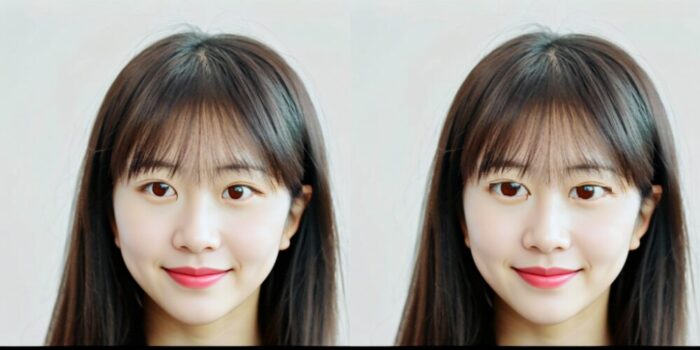
インストール
pip install mediapipe==0.10.7
プログラム
import cv2
import mediapipe as mp
import os
import numpy as np

# 入出力フォルダ
input_folder = r'C:\2026-02-26'
output_folder = r'Y:\output'
os.makedirs(output_folder, exist_ok=True)

# MediaPipe 初期化
mp_face_mesh = mp.solutions.face_mesh
face_mesh = mp_face_mesh.FaceMesh(static_image_mode=True)

# 左右の目のランドマークインデックス
LEFT_EYE_LANDMARKS = [33, 133, 160, 159, 158, 157, 173, 246]
RIGHT_EYE_LANDMARKS = [362, 263, 387, 386, 385, 384, 398, 466]

def enlarge_eye(image, landmarks, eye_indices, scale=1.2):
    h, w, _ = image.shape
    eye_points = np.array([(int(landmarks[i].x * w), int(landmarks[i].y * h)) for i in eye_indices])
    x, y, w_eye, h_eye = cv2.boundingRect(eye_points)

    # ROI 抽出と拡大
    eye_roi = image[y:y+h_eye, x:x+w_eye]
    eye_resized = cv2.resize(eye_roi, None, fx=scale, fy=scale, interpolation=cv2.INTER_LINEAR)

    # 拡大後の中心を元の位置に合わせて貼り付け
    new_h, new_w = eye_resized.shape[:2]
    center_x = x + w_eye // 2
    center_y = y + h_eye // 2
    x1 = max(center_x - new_w // 2, 0)
    y1 = max(center_y - new_h // 2, 0)
    x2 = min(x1 + new_w, image.shape[1])
    y2 = min(y1 + new_h, image.shape[0])

    # 合成
    result = image.copy()
    result[y1:y2, x1:x2] = eye_resized[0:(y2 - y1), 0:(x2 - x1)]
    return result

# 画像処理ループ
for filename in os.listdir(input_folder):
    if filename.lower().endswith(('.png', '.jpg', '.jpeg')):
        path = os.path.join(input_folder, filename)
        image = cv2.imread(path)
        rgb_image = cv2.cvtColor(image, cv2.COLOR_BGR2RGB)
        results = face_mesh.process(rgb_image)

        if results.multi_face_landmarks:
            for face_landmarks in results.multi_face_landmarks:
                image = enlarge_eye(image, face_landmarks.landmark, LEFT_EYE_LANDMARKS)
                image = enlarge_eye(image, face_landmarks.landmark, RIGHT_EYE_LANDMARKS)

        out_path = os.path.join(output_folder, filename)
        cv2.imwrite(out_path, image)
        print(f"Processed: {filename}")

face_mesh.close()