画像の色変換とマスク編集を高度かつ直感的に行える統合型ツール。
はじめに
このアプリは、画像の色変換とマスク編集を高度かつ直感的に行える統合型ツール。参照画像から色を抽出して自動的に色を合わせる Mapped モード と、Hue・Sat・Val を自由に調整できる HSV Full モード を備え、細かな色補正が可能。自動マスクは肌色検出や YCbCr 範囲に基づいて生成され、ブラシや消しゴムで手動編集でき、Undo/Redo にも対応。マスクは透明化処理や背景合成に利用でき、背景画像の読み込み・解除もワンクリックで操作できる。さらに、フォルダ内の画像を一括処理するバッチ機能や、複数色バリエーションを自動生成する機能も搭載。色取得、マスク表示、透明化、保存まで一連の作業を一つの UI で完結できる、画像色変換と背景処理に特化した高機能ツール。
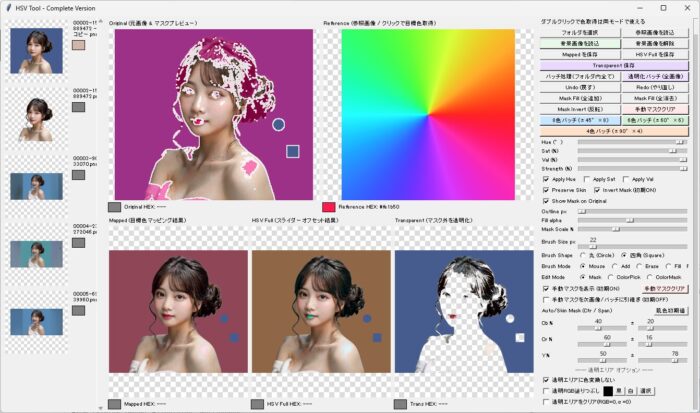
使い方
🎛 1. 画像読込・保存系ボタン
- フォルダを選択
指定フォルダ内の画像をすべて読み込み、左側のサムネイル一覧に表示する。 - 参照画像を読込
「Reference」パネルに表示する画像を読み込む。
→ この画像をクリックすると 目標色(HSV)を取得できる。 - 背景画像を読込
「Transparent」結果に背景を合成するための画像を読み込む。 - 背景画像を解除
読み込んだ背景画像をクリアする。 - Mapped を保存
「Mapped」パネルの画像(目標色マッピング結果)を保存する。 - HSV Full を保存
スライダー調整後の「HSV Full」画像を保存する。 - Transparent 保存
マスク外を透明化した画像を保存する(背景合成にも使える)。
🧰 2. バッチ処理系ボタン
- バッチ処理(フォルダ内全て)
フォルダ内の全画像に対して、現在の Mapped 設定を一括適用して保存。 - 透明化バッチ (全画像)
全画像に対して Transparent(マスク外透明化) を一括適用。 - 8色バッチ (±45°×8)
Hue を ±45°ずつ 8パターン生成して保存。 - 6色バッチ (±60°×6)
Hue を ±60°ずつ 6パターン生成して保存。 - 4色バッチ (±90°×4)
Hue を ±90°ずつ 4パターン生成して保存。
✍️ 3. マスク編集系ボタン
- Undo (戻す)
手動マスク編集の一つ前の状態に戻す。 - Redo (やり直し)
Undo を取り消して、やり直す。 - Mask Fill (全追加)
マスクを全面「追加」状態にする(全てマスク ON)。 - Mask Fill (全消去)
マスクを全面「消去」状態にする(全てマスク OFF)。 - Mask Invert (反転)
マスクを反転する(ON ↔ OFF)。
※ 初期状態で ON(invert)になっている。 - 手動マスククリア
手動で描いたマスクだけを消去し、自動マスクは残す。
🎨 4. 色取得系(キャンバス操作)
- Original(左上)をダブルクリック
→ 元画像の色を取得し、HEX と HSV を表示。 - Reference(右上)をクリック
→ 参照画像から「目標色」を取得し、Mapped に反映。 - Mapped / HSV Full / Transparent をクリック
→ 出力画像の色を取得して確認できる。
🧪 5. HSV スライダー系
- Hue (°)
色相を -180°〜180°で調整。 - Sat (%)
彩度を -100〜100% で調整。 - Val (%)
明度を -100〜100% で調整。 - Strength (%)
変化量の強さ(0〜100%)。 - Apply Hue / Sat / Val チェック
どの成分を適用するか選択。 - Preserve Skin
肌色領域を保持して色変化させない。 - Invert Mask (初期ON)
マスクの意味を反転(背景を対象にするなど)。 - Show Mask on Original
Original にマスクのオーバーレイを表示。
🖌 6. マスク描画設定
- Outline px
マスク境界線の太さ。 - Fill alpha
マスク塗りつぶしの透明度。 - Mask Scale %
マスクの膨張・収縮(Morph)。 - Brush Size px
手動マスクのブラシサイズ。
詳細な説明
🧩 1. マスク編集の仕組み(内部処理まで完全解説)
マスクは numpy の bool 配列(H×W) として管理される。
✔ マスクの種類
- 自動マスク
make_skin_mask()やその他の自動生成ロジックで作られる。 - 手動マスク
ブラシ描画・消しゴム・塗りつぶし・Undo/Redo で編集される。
両者は最終的に self.current_mask に統合される。
✔ マスク編集の流れ
- ブラシ描画 → 指定座標周辺を True(追加) にする
- 消しゴム → 指定座標周辺を False(削除) にする
- 塗りつぶし → 全面 True / 全面 False
- Undo/Redo →
dequeに保存されたマスク履歴を復元 - Invert →
mask = ~mask
✔ マスクはどこで使われる?
Mapped / HSV Full の合成処理で使われる。
_compose_with_user_mask() を使うと:
composed = Image.composite(transformed, base, mask_pil)つまり:
- mask=True → transformed(色変換後)を採用
- mask=False → base(元画像)を採用
これにより、マスクが Mapped / HSV Full に確実に反映される。
🎨 2. Mapped と HSV Full の違い(内部アルゴリズムの違い)
✔ Mapped(目標色マッピング)
apply_hsv_map_to_target_numpy() を使用。
- 参照画像から取得した 目標 HSV に向けて
Hue / Sat / Val を「絶対値で」近づける - Strength に応じて線形補間
- 肌色保持(Preserve Skin)対応
- 透明ピクセル処理(ignore / fill / clear)
目的:参照画像の色に合わせたいときに使う。
✔ HSV Full(スライダーオフセット)
apply_hsv_blend_offset_numpy() を使用。
- Hue を「相対的に +°」
- Sat を「相対的に +%」
- Val を「相対的に +%」
- Strength に応じてブレンド
目的:色調補正・色味調整・トーン調整に使う。
✔ まとめ(違いを一言で)
| モード | 目的 | 処理方式 |
|---|---|---|
| Mapped | 参照画像の色に合わせる | 絶対的に目標 HSV に近づける |
| HSV Full | 色味調整・補正 | 相対的に Hue/Sat/Val をずらす |
🎯 3. 自動マスクの精度を上げる方法(コードに基づく最適解)
✔ 1. YCbCr の範囲を調整する
あなたのコードの自動マスクは:
Cb, Cr, Y の範囲判定UI の
- Cr center / span
- Cb center / span
- Y center / span
を調整することで精度が大きく変わる。
✔ 2. Mask Scale %(Morph)を使う
scale_mask_morph() により:
- 100% → 元のマスク
- 200% → 膨張(dilation)
- 50% → 収縮(erosion)
髪の毛や輪郭の取りこぼしを補正できる。
✔ 3. 手動マスクで補正する
自動マスクは完璧ではないので:
- ブラシで追加
- 消しゴムで削除
- Undo/Redo で調整
- Outline 表示で境界確認
✔ 4. Show Mask on Original を ON
元画像にマスクを重ねて表示することで、
誤差を視覚的に確認しやすくなる。
✔ 5. 透明ピクセル処理を正しく設定
透明背景の PNG の場合:
- ignore_transparent
- fill_transparent
- clear_transparent
を適切に設定すると、マスク精度が上がる。
🖼 4. 背景合成の正しい手順(Transparent パネルの仕組み)
✔ 1. マスクを作る
自動マスク → 手動補正 → Invert(必要なら)
✔ 2. Transparent モードを確認
Transparent は:
- mask=True → 元画像の色を残す
- mask=False → alpha=0(透明)にする
つまり背景を抜く処理。
✔ 3. 背景画像を読込
右側の
「背景画像を読込」
で背景をセット。
✔ 4. 合成処理
内部では:
Image.alpha_composite(foreground, background)が使われる。
✔ 5. 保存
Transparent 保存 を押すと:
- 背景合成済み PNG
- 透明背景 PNG
どちらも保存可能(設定による)。
プログラム
#!/usr/bin/env python3
# -*- coding: utf-8 -*-
"""
HSV Tool - 完全版(コンパクトUI・ファイル名日時付き保存・マスク初期反転・自動マスク確実反映・手動ブラシ/消しゴム/塗りつぶし・Undo/Redo・バッチ処理完全対応)
- 動作環境: Python 3.x, Pillow, numpy. scipy は任意(あると高速化)
- 目的: 自動マスクおよび手動編集マスクが確実に Mapped / HSV Full に反映されるようにする
"""
import os
import tkinter as tk
from tkinter import filedialog, messagebox
from PIL import Image, ImageTk, ImageFilter, ImageChops
import numpy as np
import colorsys
from functools import partial
from collections import deque
from datetime import datetime
VERBOSE = False
try:
from scipy import ndimage
_HAS_SCIPY = True
except Exception:
ndimage = None
_HAS_SCIPY = False
def _vprint(*args, **kwargs):
if VERBOSE:
print(*args, **kwargs)
def rgb_to_hex(r, g, b):
return "#{:02x}{:02x}{:02x}".format(int(r), int(g), int(b))
def rgb_to_hsv_tuple(r, g, b):
return colorsys.rgb_to_hsv(r/255.0, g/255.0, b/255.0)
def ensure_rgba(img):
return img.convert("RGBA") if img.mode != "RGBA" else img
def split_alpha(img):
rgba = ensure_rgba(img)
rgb = rgba.convert("RGB")
alpha = rgba.split()[-1]
return rgb, alpha
def merge_alpha(rgb_img, alpha):
rgba = rgb_img.convert("RGBA")
r, g, b, _ = rgba.split()
return Image.merge("RGBA", (r, g, b, alpha))
def make_checkerboard(size=(300, 300), tile=10, color1=(255, 255, 255), color2=(220, 220, 220)):
w, h = size
board = Image.new("RGB", (w, h), color1)
px = board.load()
for y in range(h):
for x in range(w):
tx = (x // tile) % 2
ty = (y // tile) % 2
px[x, y] = color1 if (tx ^ ty) == 0 else color2
return board
def get_skin_thresholds_from_center_span_percent(cb_center_pct, cb_span_pct,
cr_center_pct, cr_span_pct,
y_center_pct, y_span_pct):
def pct_to_range(center_pct, span_pct):
center = center_pct / 100.0 * 255.0
span = span_pct / 100.0 * 255.0
mn = int(max(0, center - span / 2.0))
mx = int(min(255, center + span / 2.0))
return mn, mx
cb_min, cb_max = pct_to_range(cb_center_pct, cb_span_pct)
cr_min, cr_max = pct_to_range(cr_center_pct, cr_span_pct)
y_min, y_max = pct_to_range(y_center_pct, y_span_pct)
return cb_min, cb_max, cr_min, cr_max, y_min, y_max
def make_skin_mask(pil_img, cb_min=77, cb_max=127, cr_min=133, cr_max=173, y_min=40, y_max=240):
rgb = pil_img.convert("RGB")
arr = np.array(rgb).astype(np.int32)
if arr.ndim != 3 or arr.shape[2] < 3:
return np.zeros((arr.shape[0], arr.shape[1]), dtype=bool)
R = arr[..., 0]; G = arr[..., 1]; B = arr[..., 2]
Cb = (-0.168736 * R - 0.331264 * G + 0.5 * B) + 128.0
Cr = (0.5 * R - 0.418688 * G - 0.081312 * B) + 128.0
Y = (0.299 * R + 0.587 * G + 0.114 * B)
mask = (Cb >= cb_min) & (Cb <= cb_max) & (Cr >= cr_min) & (Cr <= cr_max)
mask &= (Y >= y_min) & (Y <= y_max)
return mask.astype(bool)
def scale_mask_morph(mask, scale_pct, max_iter=30):
if mask is None:
return None
if not isinstance(mask, np.ndarray):
mask = np.array(mask) > 0
mask_bool = mask.astype(bool)
if mask_bool.sum() == 0:
return mask_bool
ratio = float(scale_pct) / 100.0
if ratio == 1.0:
return mask_bool
iters = int(min(max_iter, max(1, round(abs(ratio - 1.0) * 30))))
try:
if _HAS_SCIPY:
structure = np.ones((3, 3), dtype=bool)
if ratio < 1.0:
out = ndimage.binary_erosion(mask_bool, structure=structure, iterations=iters)
else:
out = ndimage.binary_dilation(mask_bool, structure=structure, iterations=iters)
return out
else:
pil_mask = Image.fromarray((mask_bool.astype(np.uint8) * 255).astype(np.uint8))
size = 3 + 2 * max(0, iters - 1)
if ratio < 1.0:
inv = ImageChops.invert(pil_mask)
eroded_inv = inv.filter(ImageFilter.MaxFilter(size=size))
eroded = ImageChops.invert(eroded_inv)
out_arr = np.array(eroded) > 0
else:
dil = pil_mask.filter(ImageFilter.MaxFilter(size=size))
out_arr = np.array(dil) > 0
return out_arr
except Exception:
return mask_bool
def mask_to_outline_image(mask, thickness=1, alpha=220, color=(255, 255, 255)):
if mask is None:
return None
mask_bool = mask.astype(bool)
h, w = mask_bool.shape
if mask_bool.sum() == 0:
return Image.new("RGBA", (w, h), (0, 0, 0, 0))
if _HAS_SCIPY:
structure = np.ones((3, 3), dtype=bool)
eroded = ndimage.binary_erosion(mask_bool, structure=structure, iterations=max(1, thickness))
dilated = ndimage.binary_dilation(mask_bool, structure=structure, iterations=max(1, thickness))
outline = dilated ^ eroded
out = np.zeros((h, w, 4), dtype=np.uint8)
out[..., 0] = color[0]; out[..., 1] = color[1]; out[..., 2] = color[2]
out[..., 3] = (outline.astype(np.uint8) * alpha)
return Image.fromarray(out, mode="RGBA")
else:
pil_mask = Image.fromarray((mask_bool.astype(np.uint8) * 255).astype(np.uint8))
size = 3 + 2 * max(0, thickness - 1)
dil = pil_mask.filter(ImageFilter.MaxFilter(size=size))
inv = ImageChops.invert(pil_mask)
eroded_inv = inv.filter(ImageFilter.MaxFilter(size=size))
eroded = ImageChops.invert(eroded_inv)
outline = ImageChops.difference(dil, eroded).convert("L")
white = Image.new("RGBA", (w, h), (color[0], color[1], color[2], 0))
white.putalpha(outline.point(lambda p: int(p / 255.0 * alpha)))
return white
def make_mask_overlay_display(img, mask, overlay_color=(255, 0, 128), fill_alpha=120, outline_mode=True, outline_thickness=1, outline_alpha=220):
base = img.convert("RGBA")
w, h = base.size
if mask is None:
return base.convert("RGB")
if not isinstance(mask, np.ndarray):
try:
mask = np.array(mask)
except Exception:
return base.convert("RGB")
if mask.dtype != bool:
mask = mask > 0
composed = base.copy()
if fill_alpha > 0:
overlay = Image.new("RGBA", (w, h), (overlay_color[0], overlay_color[1], overlay_color[2], 0))
mask_img = Image.fromarray((mask.astype(np.uint8) * fill_alpha).astype(np.uint8))
overlay.putalpha(mask_img)
composed = Image.alpha_composite(composed, overlay)
if outline_mode:
outline_img = mask_to_outline_image(mask, thickness=max(1, int(outline_thickness)), alpha=outline_alpha, color=(255, 255, 255))
if outline_img is not None:
composed = Image.alpha_composite(composed, outline_img)
return composed.convert("RGB")
def apply_hsv_map_to_target_numpy(img, target_hsv, strength, use_h, use_s, use_v, preserve_skin=False,
cb_min=77, cb_max=127, cr_min=133, cr_max=173, y_min=40, y_max=240,
ignore_transparent=False, fill_transparent=False, clear_transparent=False,
trans_fill_color=(0, 0, 0)):
h_t, s_t, v_t = target_hsv
if img.mode == "RGBA":
rgb_img, alpha = split_alpha(img)
alpha_arr = np.array(alpha) # shape (H, W), uint8
else:
rgb_img = img.convert("RGB")
alpha = None
alpha_arr = None
skin_mask = None
if preserve_skin:
skin_mask = make_skin_mask(rgb_img, cb_min, cb_max, cr_min, cr_max, y_min, y_max)
orig_arr_rgb = np.array(rgb_img) # 元RGB保持(透明ピクセル復元用)
arr = orig_arr_rgb.astype(np.float32) / 255.0
maxc = np.max(arr, axis=-1); minc = np.min(arr, axis=-1); delta = maxc - minc
hue = np.zeros_like(maxc); mask = delta != 0
idx = (maxc == arr[..., 0]) & mask
hue[idx] = (arr[..., 1][idx] - arr[..., 2][idx]) / delta[idx]
idx = (maxc == arr[..., 1]) & mask
hue[idx] = 2.0 + (arr[..., 2][idx] - arr[..., 0][idx]) / delta[idx]
idx = (maxc == arr[..., 2]) & mask
hue[idx] = 4.0 + (arr[..., 0][idx] - arr[..., 1][idx]) / delta[idx]
hue = (hue / 6.0) % 1.0
sat = np.zeros_like(maxc); sat[maxc != 0] = delta[maxc != 0] / maxc[maxc != 0]
val = maxc
if use_h:
dh = (h_t - hue + 0.5) % 1.0 - 0.5
hue = (hue + strength * dh) % 1.0
if use_s:
sat = np.clip((1 - strength) * sat + strength * s_t, 0.0, 1.0)
if use_v:
val = np.clip((1 - strength) * val + strength * v_t, 0.0, 1.0)
i = np.floor(hue * 6).astype(int) % 6; f = hue * 6 - np.floor(hue * 6)
p = val * (1 - sat); q = val * (1 - f * sat); t = val * (1 - (1 - f) * sat)
r2 = np.zeros_like(val); g2 = np.zeros_like(val); b2 = np.zeros_like(val)
idx = (i == 0); r2[idx], g2[idx], b2[idx] = val[idx], t[idx], p[idx]
idx = (i == 1); r2[idx], g2[idx], b2[idx] = q[idx], val[idx], p[idx]
idx = (i == 2); r2[idx], g2[idx], b2[idx] = p[idx], val[idx], t[idx]
idx = (i == 3); r2[idx], g2[idx], b2[idx] = p[idx], q[idx], val[idx]
idx = (i == 4); r2[idx], g2[idx], b2[idx] = t[idx], p[idx], val[idx]
idx = (i == 5); r2[idx], g2[idx], b2[idx] = val[idx], p[idx], q[idx]
out = np.stack([r2, g2, b2], axis=-1)
out_arr = np.clip(out * 255.0, 0, 255).astype(np.uint8)
# 透明(alpha=0)ピクセルに対する処理(色彩をつけない/色変更/クリア)
if alpha_arr is not None:
transparent_mask = (alpha_arr == 0)
if clear_transparent:
out_arr[transparent_mask] = 0
elif fill_transparent:
fr, fg, fb = trans_fill_color
out_arr[transparent_mask, 0] = fr
out_arr[transparent_mask, 1] = fg
out_arr[transparent_mask, 2] = fb
elif ignore_transparent:
out_arr[transparent_mask] = orig_arr_rgb[transparent_mask]
out_img_rgb = Image.fromarray(out_arr)
if preserve_skin and skin_mask is not None:
out_arr2 = np.array(out_img_rgb); orig_arr2 = np.array(rgb_img)
out_arr2[skin_mask] = orig_arr2[skin_mask]; out_img_rgb = Image.fromarray(out_arr2)
if alpha is not None:
out_img = merge_alpha(out_img_rgb, alpha)
else:
out_img = out_img_rgb
return out_img
def apply_hsv_blend_offset_numpy(img, h_offset, s_offset, v_offset, strength, use_h, use_s, use_v, preserve_skin=False,
cb_min=77, cb_max=127, cr_min=133, cr_max=173, y_min=40, y_max=240,
ignore_transparent=False, fill_transparent=False, clear_transparent=False,
trans_fill_color=(0, 0, 0)):
if img.mode == "RGBA":
rgb_img, alpha = split_alpha(img)
alpha_arr = np.array(alpha)
else:
rgb_img = img.convert("RGB")
alpha = None
alpha_arr = None
skin_mask = None
if preserve_skin:
skin_mask = make_skin_mask(rgb_img, cb_min, cb_max, cr_min, cr_max, y_min, y_max)
orig_arr_rgb = np.array(rgb_img)
arr = orig_arr_rgb.astype(np.float32) / 255.0
maxc = np.max(arr, axis=-1); minc = np.min(arr, axis=-1); delta = maxc - minc
hue = np.zeros_like(maxc); mask = delta != 0
idx = (maxc == arr[..., 0]) & mask
hue[idx] = (arr[..., 1][idx] - arr[..., 2][idx]) / delta[idx]
idx = (maxc == arr[..., 1]) & mask
hue[idx] = 2.0 + (arr[..., 2][idx] - arr[..., 0][idx]) / delta[idx]
idx = (maxc == arr[..., 2]) & mask
hue[idx] = 4.0 + (arr[..., 0][idx] - arr[..., 1][idx]) / delta[idx]
hue = (hue / 6.0) % 1.0
sat = np.zeros_like(maxc); sat[maxc != 0] = delta[maxc != 0] / maxc[maxc != 0]
val = maxc
if use_h:
hue = (1 - strength) * hue + strength * ((hue + h_offset) % 1.0)
if use_s:
sat = (1 - strength) * sat + strength * np.clip(sat + s_offset, 0.0, 1.0)
if use_v:
val = (1 - strength) * val + strength * np.clip(val + v_offset, 0.0, 1.0)
i = np.floor(hue * 6).astype(int) % 6; f = hue * 6 - np.floor(hue * 6)
p = val * (1 - sat); q = val * (1 - f * sat); t = val * (1 - (1 - f) * sat)
r2 = np.zeros_like(val); g2 = np.zeros_like(val); b2 = np.zeros_like(val)
idx = (i == 0); r2[idx], g2[idx], b2[idx] = val[idx], t[idx], p[idx]
idx = (i == 1); r2[idx], g2[idx], b2[idx] = q[idx], val[idx], p[idx]
idx = (i == 2); r2[idx], g2[idx], b2[idx] = p[idx], val[idx], t[idx]
idx = (i == 3); r2[idx], g2[idx], b2[idx] = p[idx], q[idx], val[idx]
idx = (i == 4); r2[idx], g2[idx], b2[idx] = t[idx], p[idx], val[idx]
idx = (i == 5); r2[idx], g2[idx], b2[idx] = val[idx], p[idx], q[idx]
out = np.stack([r2, g2, b2], axis=-1)
out_arr = np.clip(out * 255.0, 0, 255).astype(np.uint8)
# 透明(alpha=0)ピクセルに対する処理(色彩をつけない/色変更/クリア)
if alpha_arr is not None:
transparent_mask = (alpha_arr == 0)
if clear_transparent:
out_arr[transparent_mask] = 0
elif fill_transparent:
fr, fg, fb = trans_fill_color
out_arr[transparent_mask, 0] = fr
out_arr[transparent_mask, 1] = fg
out_arr[transparent_mask, 2] = fb
elif ignore_transparent:
out_arr[transparent_mask] = orig_arr_rgb[transparent_mask]
out_img_rgb = Image.fromarray(out_arr)
if preserve_skin and skin_mask is not None:
out_arr2 = np.array(out_img_rgb); orig_arr2 = np.array(rgb_img)
out_arr2[skin_mask] = orig_arr2[skin_mask]; out_img_rgb = Image.fromarray(out_arr2)
if alpha is not None:
out_img = merge_alpha(out_img_rgb, alpha)
else:
out_img = out_img_rgb
return out_img
class ColorTool:
def __init__(self, root):
self.root = root
self.root.title("HSV Tool - Complete Version")
self.root.geometry("1340x760")
self.small_font = ("TkDefaultFont", 8)
# left thumbnails
self.frame_left = tk.Frame(root, width=200)
self.frame_left.pack(side="left", fill="y")
self.frame_left.pack_propagate(False)
self.scroll_canvas = tk.Canvas(self.frame_left, width=180, height=740)
self.scroll_canvas.pack(side="left", fill="y", expand=False)
self.scrollbar = tk.Scrollbar(self.frame_left, orient="vertical", command=self.scroll_canvas.yview)
self.scrollbar.pack(side="right", fill="y")
self.scroll_canvas.configure(yscrollcommand=self.scrollbar.set)
self.thumb_frame = tk.Frame(self.scroll_canvas)
self.thumb_window = self.scroll_canvas.create_window((0, 0), window=self.thumb_frame, anchor="nw")
self.thumb_frame.bind("<Configure>", self._on_frame_configure)
self.scroll_canvas.bind("<Enter>", lambda e: self._bind_mousewheel(True))
self.scroll_canvas.bind("<Leave>", lambda e: self._bind_mousewheel(False))
# center (top 2, bottom 3)
self.frame_center = tk.Frame(root)
self.frame_center.pack(side="left", fill="both", expand=True, padx=4, pady=4)
self.frame_center.pack_propagate(False)
self.top_row_frame = tk.Frame(self.frame_center)
self.top_row_frame.grid(row=0, column=0, sticky="nsew", pady=(0, 2))
self.bottom_row_frame = tk.Frame(self.frame_center)
self.bottom_row_frame.grid(row=1, column=0, sticky="nsew", pady=(2, 0))
self.frame_center.grid_rowconfigure(0, weight=1)
self.frame_center.grid_rowconfigure(1, weight=1)
self.frame_center.grid_columnconfigure(0, weight=1)
# Top row: 2 columns (Original, Reference)
self.top_row_frame.grid_rowconfigure(0, weight=1)
self.top_row_frame.grid_columnconfigure(0, weight=1)
self.top_row_frame.grid_columnconfigure(1, weight=1)
self.top_left_frame = tk.Frame(self.top_row_frame); self.top_left_frame.grid(row=0, column=0, padx=2, pady=2, sticky="nsew")
self.top_right_frame = tk.Frame(self.top_row_frame); self.top_right_frame.grid(row=0, column=1, padx=2, pady=2, sticky="nsew")
# Bottom row: 3 columns (Mapped, HSV Full, Transparent)
self.bottom_row_frame.grid_rowconfigure(0, weight=1)
self.bottom_row_frame.grid_columnconfigure(0, weight=1)
self.bottom_row_frame.grid_columnconfigure(1, weight=1)
self.bottom_row_frame.grid_columnconfigure(2, weight=1)
self.bottom_left_frame = tk.Frame(self.bottom_row_frame); self.bottom_left_frame.grid(row=0, column=0, padx=2, pady=2, sticky="nsew")
self.bottom_mid_frame = tk.Frame(self.bottom_row_frame); self.bottom_mid_frame.grid(row=0, column=1, padx=2, pady=2, sticky="nsew")
self.bottom_right_frame = tk.Frame(self.bottom_row_frame); self.bottom_right_frame.grid(row=0, column=2, padx=2, pady=2, sticky="nsew")
self.panel_w = 240; self.panel_h = 260
# Original (左上)
tk.Label(self.top_left_frame, text="Original (元画像 & マスクプレビュー)", font=self.small_font).pack(anchor="w")
self.canvas_tl = tk.Canvas(self.top_left_frame, width=self.panel_w, height=self.panel_h, bg="gray")
self.canvas_tl.pack(fill="both", expand=True)
self.canvas_tl.bind("<Double-Button-1>", self.pick_color_main)
info_frame_tl = tk.Frame(self.top_left_frame); info_frame_tl.pack(anchor="w", pady=(2, 0))
self.tl_swatch = tk.Label(info_frame_tl, width=3, height=1, bg="#808080", bd=1, relief="solid"); self.tl_swatch.pack(side="left", padx=(0, 4))
self.tl_info = tk.Label(info_frame_tl, text="Original HEX: ---", font=self.small_font); self.tl_info.pack(side="left")
# Reference (右上)
tk.Label(self.top_right_frame, text="Reference (参照画像 / クリックで目標色取得)", font=self.small_font).pack(anchor="w")
self.canvas_tr = tk.Canvas(self.top_right_frame, width=self.panel_w, height=self.panel_h, bg="gray")
self.canvas_tr.pack(fill="both", expand=True)
self.canvas_tr.bind("<Button-1>", self.pick_color_ref)
info_frame_tr = tk.Frame(self.top_right_frame); info_frame_tr.pack(anchor="w", pady=(2, 0))
self.tr_swatch = tk.Label(info_frame_tr, width=3, height=1, bg="#808080", bd=1, relief="solid"); self.tr_swatch.pack(side="left", padx=(0, 4))
self.tr_info = tk.Label(info_frame_tr, text="Reference HEX: ---", font=self.small_font); self.tr_info.pack(side="left")
# Mapped (下左)
tk.Label(self.bottom_left_frame, text="Mapped (目標色マッピング結果)", font=self.small_font).pack(anchor="w")
self.canvas_bl = tk.Canvas(self.bottom_left_frame, width=self.panel_w, height=self.panel_h, bg="gray")
self.canvas_bl.pack(fill="both", expand=True)
self.canvas_bl.bind("<Button-1>", self.pick_color_out)
info_frame_bl = tk.Frame(self.bottom_left_frame); info_frame_bl.pack(anchor="w", pady=(2, 0))
self.bl_swatch = tk.Label(info_frame_bl, width=3, height=1, bg="#808080", bd=1, relief="solid"); self.bl_swatch.pack(side="left", padx=(0, 4))
self.bl_info = tk.Label(info_frame_bl, text="Mapped HEX: ---", font=self.small_font); self.bl_info.pack(side="left")
# HSV Full (下中)
tk.Label(self.bottom_mid_frame, text="HSV Full (スライダーオフセット結果)", font=self.small_font).pack(anchor="w")
self.canvas_bm = tk.Canvas(self.bottom_mid_frame, width=self.panel_w, height=self.panel_h, bg="gray")
self.canvas_bm.pack(fill="both", expand=True)
self.canvas_bm.bind("<Button-1>", self.pick_color_full)
info_frame_bm = tk.Frame(self.bottom_mid_frame); info_frame_bm.pack(anchor="w", pady=(2, 0))
self.bm_swatch = tk.Label(info_frame_bm, width=3, height=1, bg="#808080", bd=1, relief="solid"); self.bm_swatch.pack(side="left", padx=(0, 4))
self.bm_info = tk.Label(info_frame_bm, text="HSV Full HEX: ---", font=self.small_font); self.bm_info.pack(side="left")
# Transparent (下右)
tk.Label(self.bottom_right_frame, text="Transparent (マスク外を透明化)", font=self.small_font).pack(anchor="w")
self.canvas_br = tk.Canvas(self.bottom_right_frame, width=self.panel_w, height=self.panel_h, bg="gray")
self.canvas_br.pack(fill="both", expand=True)
self.canvas_br.bind("<Button-1>", self.pick_color_trans)
info_frame_br = tk.Frame(self.bottom_right_frame); info_frame_br.pack(anchor="w", pady=(2, 0))
self.br_swatch = tk.Label(info_frame_br, width=3, height=1, bg="#808080", bd=1, relief="solid"); self.br_swatch.pack(side="left", padx=(0, 4))
self.br_info = tk.Label(info_frame_br, text="Trans HEX: ---", font=self.small_font); self.br_info.pack(side="left")
# right controls
self.frame_right = tk.Frame(root, width=310)
self.frame_right.pack(side="right", fill="y")
self.frame_right.pack_propagate(False)
self.right_canvas = tk.Canvas(self.frame_right, width=290, height=760)
self.right_scroll = tk.Scrollbar(self.frame_right, orient="vertical", command=self.right_canvas.yview)
self.right_canvas.configure(yscrollcommand=self.right_scroll.set)
slider_frame = tk.Frame(self.frame_right, width=20)
self.right_canvas.pack(side="left", fill="both", expand=True)
slider_frame.pack(side="left", fill="y", padx=(1, 1), pady=1)
self.right_scroll.pack(side="right", fill="y")
self.right_inner = tk.Frame(self.right_canvas)
self.right_window = self.right_canvas.create_window((0, 0), window=self.right_inner, anchor="nw")
self.right_inner.bind("<Configure>", lambda e: (self.right_canvas.configure(scrollregion=self.right_canvas.bbox("all")), self._update_right_slider_range()))
def _on_right_canvas_config(e):
try:
self.right_canvas.itemconfig(self.right_window, width=e.width)
except Exception:
pass
self.right_canvas.bind("<Configure>", _on_right_canvas_config)
self.right_canvas.bind("<Enter>", lambda e: self._bind_right_mousewheel(True))
self.right_canvas.bind("<Leave>", lambda e: self._bind_right_mousewheel(False))
self.right_scroll_slider = tk.Scale(slider_frame, from_=0, to=100, orient="vertical", showvalue=False, length=300, command=self._on_right_slider_move, sliderrelief="flat", width=8)
self.right_scroll_slider.set(0)
self.right_scroll_slider.pack(fill="y", expand=True)
slider_length = 120
def add_labeled_scale(parent, row, label_text, from_, to, orient="horizontal", length=slider_length, showvalue=False, init=0, resolution=1):
lbl = tk.Label(parent, text=label_text, font=self.small_font, anchor="w")
lbl.grid(row=row, column=0, sticky="w", padx=(2, 1), pady=0)
s = tk.Scale(parent, from_=from_, to=to, orient=orient, length=length, showvalue=showvalue, resolution=resolution,
width=8, sliderlength=14, highlightthickness=0, bd=1)
s.grid(row=row, column=1, sticky="ew", padx=(0, 2), pady=0)
parent.grid_columnconfigure(1, weight=1)
s.set(init)
return s
ctrl = tk.Frame(self.right_inner)
ctrl.pack(fill="both", expand=True, padx=2, pady=1)
tk.Label(ctrl, text="ダブルクリックで色取得は両モードで使える", font=self.small_font).pack(padx=2, pady=(0, 2), anchor="w")
# 2-column compact buttons
btn_frame = tk.Frame(ctrl)
btn_frame.pack(fill="x", padx=1, pady=(0, 2))
btn_frame.grid_columnconfigure(0, weight=1)
btn_frame.grid_columnconfigure(1, weight=1)
tk.Button(btn_frame, text="フォルダを選択", command=self.load_folder, font=self.small_font).grid(row=0, column=0, sticky="ew", padx=1, pady=1)
tk.Button(btn_frame, text="参照画像を読込", command=self.load_reference_image, font=self.small_font).grid(row=0, column=1, sticky="ew", padx=1, pady=1)
tk.Button(btn_frame, text="背景画像を読込", command=self.load_background_image, font=self.small_font, bg="#e8f8e8").grid(row=1, column=0, sticky="ew", padx=1, pady=1)
tk.Button(btn_frame, text="背景画像を解除", command=self.clear_background_image, font=self.small_font).grid(row=1, column=1, sticky="ew", padx=1, pady=1)
tk.Button(btn_frame, text="Mapped を保存", command=self.save_transformed_image, font=self.small_font).grid(row=2, column=0, sticky="ew", padx=1, pady=1)
tk.Button(btn_frame, text="HSV Full を保存", command=self.save_full_image, font=self.small_font).grid(row=2, column=1, sticky="ew", padx=1, pady=1)
tk.Button(btn_frame, text="Transparent 保存", command=self.save_transparent_image, font=self.small_font, bg="#e8d8ff").grid(row=3, column=0, columnspan=2, sticky="ew", padx=1, pady=1)
tk.Button(btn_frame, text="バッチ処理(フォルダ内全て)", command=self.batch_process_folder, font=self.small_font).grid(row=4, column=0, sticky="ew", padx=1, pady=1)
tk.Button(btn_frame, text="透明化バッチ (全画像)", command=self.batch_process_transparent, font=self.small_font, bg="#f0e0ff").grid(row=4, column=1, sticky="ew", padx=1, pady=1)
tk.Button(btn_frame, text="Undo (戻す)", command=lambda: self.undo_mask(), font=self.small_font).grid(row=5, column=0, sticky="ew", padx=1, pady=1)
tk.Button(btn_frame, text="Redo (やり直し)", command=lambda: self.redo_mask(), font=self.small_font).grid(row=5, column=1, sticky="ew", padx=1, pady=1)
tk.Button(btn_frame, text="Mask Fill (全追加)", command=lambda: self.fill_mask_add(), font=self.small_font).grid(row=6, column=0, sticky="ew", padx=1, pady=1)
tk.Button(btn_frame, text="Mask Fill (全消去)", command=lambda: self.fill_mask_erase(), font=self.small_font).grid(row=6, column=1, sticky="ew", padx=1, pady=1)
tk.Button(btn_frame, text="Mask Invert (反転)", command=lambda: self.invert_mask(), font=self.small_font).grid(row=7, column=0, sticky="ew", padx=1, pady=1)
tk.Button(btn_frame, text="手動マスククリア", command=self.clear_user_masks, font=self.small_font, bg="#ffe8e8").grid(row=7, column=1, sticky="ew", padx=1, pady=1)
tk.Button(btn_frame, text="8色バッチ (±45°×8)", command=self.batch_process_8colors, font=self.small_font, bg="#c8e6ff").grid(row=8, column=0, sticky="ew", padx=1, pady=1)
tk.Button(btn_frame, text="6色バッチ (±60°×6)", command=self.batch_process_6colors, font=self.small_font, bg="#d4f0d4").grid(row=8, column=1, sticky="ew", padx=1, pady=1)
tk.Button(btn_frame, text="4色バッチ (±90°×4)", command=self.batch_process_4colors, font=self.small_font, bg="#ffe0c8").grid(row=9, column=0, columnspan=2, sticky="ew", padx=1, pady=1)
grid_parent = tk.Frame(ctrl)
grid_parent.pack(fill="x", padx=1, pady=0)
r = 0
self.h_scale = add_labeled_scale(grid_parent, r, "Hue (°)", -180, 180, init=0); r += 1
self.s_scale = add_labeled_scale(grid_parent, r, "Sat (%)", -100, 100, init=0); r += 1
self.v_scale = add_labeled_scale(grid_parent, r, "Val (%)", -100, 100, init=0); r += 1
self.strength_scale = add_labeled_scale(grid_parent, r, "Strength (%)", 0, 100, init=100); r += 1
self.h_var = tk.IntVar(value=1); self.s_var = tk.IntVar(value=0); self.v_var = tk.IntVar(value=0)
chk_frame = tk.Frame(grid_parent); chk_frame.grid(row=r, column=0, columnspan=2, sticky="w", padx=2, pady=(1, 0)); r += 1
tk.Checkbutton(chk_frame, text="Apply Hue", variable=self.h_var, command=self.update_hsv_from_slider, font=self.small_font).pack(side="left", padx=(0, 4))
tk.Checkbutton(chk_frame, text="Apply Sat", variable=self.s_var, command=self.update_hsv_from_slider, font=self.small_font).pack(side="left", padx=(0, 4))
tk.Checkbutton(chk_frame, text="Apply Val", variable=self.v_var, command=self.update_hsv_from_slider, font=self.small_font).pack(side="left")
self.preserve_skin_var = tk.IntVar(value=1)
self.invert_mask_var = tk.IntVar(value=1) # マスク反転状態を初期値ONに設定
self.show_preserved_var = tk.IntVar(value=1)
chk_frame2 = tk.Frame(grid_parent); chk_frame2.grid(row=r, column=0, columnspan=2, sticky="w", padx=2, pady=0); r += 1
tk.Checkbutton(chk_frame2, text="Preserve Skin", variable=self.preserve_skin_var, command=self.update_hsv_from_slider, font=self.small_font).pack(side="left", padx=(0, 4))
tk.Checkbutton(chk_frame2, text="Invert Mask (初期ON)", variable=self.invert_mask_var, command=self.update_hsv_from_slider, font=self.small_font).pack(side="left")
tk.Checkbutton(grid_parent, text="Show Mask on Original", variable=self.show_preserved_var, command=self.update_hsv_from_slider, font=self.small_font).grid(row=r, column=0, columnspan=2, sticky="w", padx=2, pady=(0, 1)); r += 1
self.outline_thickness_scale = add_labeled_scale(grid_parent, r, "Outline px", 1, 8, init=1); r += 1
self.fill_alpha_scale = add_labeled_scale(grid_parent, r, "Fill alpha", 0, 255, init=120); r += 1
self.mask_scale = add_labeled_scale(grid_parent, r, "Mask Scale %", 50, 200, init=100); r += 1
tk.Label(grid_parent, text="Brush Size px", font=self.small_font).grid(row=r, column=0, sticky="w", padx=(2, 1), pady=0)
self.brush_size = tk.Scale(grid_parent, from_=1, to=200, orient="horizontal", length=slider_length, showvalue=True,
width=8, sliderlength=14, highlightthickness=0, bd=1)
self.brush_size.set(22)
self.brush_size.grid(row=r, column=1, sticky="ew", padx=(0, 2), pady=0)
r += 1
tk.Label(grid_parent, text="Brush Shape", font=self.small_font).grid(row=r, column=0, sticky="w", padx=(2, 1), pady=0)
self.brush_shape_var = tk.StringVar(value="circle")
bs_frame = tk.Frame(grid_parent)
bs_frame.grid(row=r, column=1, sticky="w", padx=(0, 2), pady=0)
tk.Radiobutton(bs_frame, text="丸 (Circle)", variable=self.brush_shape_var, value="circle", command=self._on_brush_mode_change, font=self.small_font).pack(side="left")
tk.Radiobutton(bs_frame, text="四角 (Square)", variable=self.brush_shape_var, value="square", command=self._on_brush_mode_change, font=self.small_font).pack(side="left", padx=(4, 0))
r += 1
tk.Label(grid_parent, text="Brush Mode", font=self.small_font).grid(row=r, column=0, sticky="w", padx=(2, 1), pady=0)
self.brush_mode_var = tk.StringVar(value="mouse")
bm_frame = tk.Frame(grid_parent)
bm_frame.grid(row=r, column=1, sticky="w", padx=(0, 2), pady=0)
tk.Radiobutton(bm_frame, text="Mouse", variable=self.brush_mode_var, value="mouse", command=self._on_brush_mode_change, font=self.small_font).pack(side="left")
tk.Radiobutton(bm_frame, text="Add", variable=self.brush_mode_var, value="add", command=self._on_brush_mode_change, font=self.small_font).pack(side="left", padx=(2, 0))
tk.Radiobutton(bm_frame, text="Erase", variable=self.brush_mode_var, value="erase", command=self._on_brush_mode_change, font=self.small_font).pack(side="left", padx=(2, 0))
tk.Radiobutton(bm_frame, text="Fill", variable=self.brush_mode_var, value="fill", command=self._on_brush_mode_change, font=self.small_font).pack(side="left", padx=(2, 0))
tk.Radiobutton(bm_frame, text="FillE", variable=self.brush_mode_var, value="fill_erase", command=self._on_brush_mode_change, font=self.small_font).pack(side="left", padx=(2, 0))
r += 1
tk.Label(grid_parent, text="Edit Mode", font=self.small_font).grid(row=r, column=0, sticky="w", padx=(2, 1), pady=0)
self.edit_mode_var = tk.StringVar(value="mask")
mode_frame = tk.Frame(grid_parent)
mode_frame.grid(row=r, column=1, sticky="w", padx=(0, 2), pady=0)
tk.Radiobutton(mode_frame, text="Mask", variable=self.edit_mode_var, value="mask", command=self._on_edit_mode_change, font=self.small_font).pack(side="left")
tk.Radiobutton(mode_frame, text="ColorPick", variable=self.edit_mode_var, value="color", command=self._on_edit_mode_change, font=self.small_font).pack(side="left", padx=(2, 0))
tk.Radiobutton(mode_frame, text="ColorMask", variable=self.edit_mode_var, value="colormask", command=self._on_edit_mode_change, font=self.small_font).pack(side="left", padx=(2, 0))
r += 1
# 手動書き込みマスクの表示・保持・クリア設定
self.show_user_mask_var = tk.IntVar(value=1) # 手動マスクを表示(初期ON)
self.keep_user_mask_var = tk.IntVar(value=0) # 手動マスクを他画像/バッチに引継ぎ(初期OFF)
um_frame = tk.Frame(grid_parent)
um_frame.grid(row=r, column=0, columnspan=2, sticky="ew", padx=2, pady=(1, 0))
tk.Checkbutton(um_frame, text="手動マスクを表示 (初期ON)", variable=self.show_user_mask_var,
command=self.update_hsv_from_slider, font=self.small_font).pack(side="left")
tk.Button(um_frame, text="手動マスククリア", command=self.clear_user_masks, font=self.small_font, padx=2, pady=0, bg="#ffe8e8").pack(side="right")
r += 1
tk.Checkbutton(grid_parent, text="手動マスクを次画像/バッチに引継ぎ (初期OFF)",
variable=self.keep_user_mask_var, font=self.small_font).grid(row=r, column=0, columnspan=2, sticky="w", padx=2, pady=(0, 1))
r += 1
# Skin / Color detection sliders (コンパクトな横並びペア構成)
skin_hdr = tk.Frame(grid_parent)
skin_hdr.grid(row=r, column=0, columnspan=2, sticky="ew", padx=2, pady=(1, 0))
tk.Label(skin_hdr, text="Auto/Skin Mask (Ctr / Span)", font=self.small_font).pack(side="left")
tk.Button(skin_hdr, text="肌色初期値", command=self.reset_skin_thresholds, font=self.small_font, padx=2, pady=0).pack(side="right")
r += 1
def add_pair_scales(parent, row, label_text, c_init, s_init):
tk.Label(parent, text=label_text, font=self.small_font, anchor="w").grid(row=row, column=0, sticky="w", padx=(2, 1), pady=0)
p_frame = tk.Frame(parent)
p_frame.grid(row=row, column=1, sticky="ew", padx=(0, 2), pady=0)
p_frame.grid_columnconfigure(0, weight=1)
p_frame.grid_columnconfigure(2, weight=1)
s_c = tk.Scale(p_frame, from_=0, to=100, orient="horizontal", showvalue=True,
width=8, sliderlength=12, highlightthickness=0, bd=1)
s_c.grid(row=0, column=0, sticky="ew")
s_c.set(c_init)
tk.Label(p_frame, text="±", font=self.small_font).grid(row=0, column=1, padx=1)
s_s = tk.Scale(p_frame, from_=0, to=100, orient="horizontal", showvalue=True,
width=8, sliderlength=12, highlightthickness=0, bd=1)
s_s.grid(row=0, column=2, sticky="ew")
s_s.set(s_init)
return s_c, s_s
self.cb_center, self.cb_span = add_pair_scales(grid_parent, r, "Cb %", 40, 20); r += 1
self.cr_center, self.cr_span = add_pair_scales(grid_parent, r, "Cr %", 60, 16); r += 1
self.y_center, self.y_span = add_pair_scales(grid_parent, r, "Y %", 50, 78); r += 1
# --- 透明エリア処理オプション ---
tk.Label(grid_parent, text="── 透明エリア オプション ──", font=self.small_font, fg="#666666").grid(
row=r, column=0, columnspan=2, sticky="ew", padx=2, pady=(4, 0)); r += 1
self.ignore_transparent_var = tk.IntVar(value=1)
self.fill_transparent_var = tk.IntVar(value=0)
self.clear_transparent_var = tk.IntVar(value=0)
self.trans_fill_color = (0, 0, 0) # デフォルト塗りつぶし色: 黒
trans_chk1 = tk.Frame(grid_parent)
trans_chk1.grid(row=r, column=0, columnspan=2, sticky="w", padx=2, pady=0); r += 1
tk.Checkbutton(trans_chk1, text="透明エリアに色変換しない",
variable=self.ignore_transparent_var,
command=self.update_hsv_from_slider,
font=self.small_font).pack(side="left")
trans_chk2 = tk.Frame(grid_parent)
trans_chk2.grid(row=r, column=0, columnspan=2, sticky="w", padx=2, pady=0); r += 1
tk.Checkbutton(trans_chk2, text="透明RGB塗りつぶし",
variable=self.fill_transparent_var,
command=self.update_hsv_from_slider,
font=self.small_font).pack(side="left")
self.trans_fill_swatch = tk.Label(trans_chk2, width=2, height=1, bg="#000000", bd=1, relief="solid")
self.trans_fill_swatch.pack(side="left", padx=(2, 2))
tk.Button(trans_chk2, text="黒", font=self.small_font, padx=2, pady=0,
command=lambda: self._set_trans_fill_color(0, 0, 0)).pack(side="left", padx=(0, 1))
tk.Button(trans_chk2, text="白", font=self.small_font, padx=2, pady=0,
command=lambda: self._set_trans_fill_color(255, 255, 255)).pack(side="left", padx=(0, 1))
tk.Button(trans_chk2, text="選択", font=self.small_font, padx=2, pady=0,
command=self._pick_trans_fill_color).pack(side="left")
trans_chk3 = tk.Frame(grid_parent)
trans_chk3.grid(row=r, column=0, columnspan=2, sticky="w", padx=2, pady=(0, 2)); r += 1
tk.Checkbutton(trans_chk3, text="透明エリアをクリア(RGB=0,α=0)",
variable=self.clear_transparent_var,
command=self.update_hsv_from_slider,
font=self.small_font).pack(side="left")
# --- 保存・背景オプション ---
tk.Label(grid_parent, text="── 保存・背景オプション ──", font=self.small_font, fg="#666666").grid(
row=r, column=0, columnspan=2, sticky="ew", padx=2, pady=(4, 0)); r += 1
self.save_as_transparent_var = tk.IntVar(value=1) # 初期は画像を透明で保存する
self.use_bg_image_var = tk.IntVar(value=0) # 初期は背景設定しない
save_trans_frame = tk.Frame(grid_parent)
save_trans_frame.grid(row=r, column=0, columnspan=2, sticky="w", padx=2, pady=0); r += 1
tk.Checkbutton(save_trans_frame, text="画像を透明で保存 (初期ON)",
variable=self.save_as_transparent_var,
font=self.small_font).pack(side="left")
bg_opt_frame = tk.Frame(grid_parent)
bg_opt_frame.grid(row=r, column=0, columnspan=2, sticky="w", padx=2, pady=(0, 2)); r += 1
tk.Checkbutton(bg_opt_frame, text="背景画像を適用 (初期OFF)",
variable=self.use_bg_image_var,
command=self.update_hsv_from_slider,
font=self.small_font).pack(side="left")
self.bg_status_label = tk.Label(bg_opt_frame, text="[背景: 未設定]", font=self.small_font, fg="#666666")
self.bg_status_label.pack(side="left", padx=(2, 0))
for s in (self.h_scale, self.s_scale, self.v_scale, self.strength_scale,
self.outline_thickness_scale, self.fill_alpha_scale, self.mask_scale,
self.cb_center, self.cb_span, self.cr_center, self.cr_span, self.y_center, self.y_span,
self.brush_size):
try:
s.configure(command=lambda v, s=s: self.update_hsv_from_slider())
s.bind("<B1-Motion>", lambda e, s=s: self.update_hsv_from_slider())
s.bind("<ButtonRelease-1>", lambda e, s=s: self.update_hsv_from_slider())
except Exception:
pass
# brush state
self.user_add_mask = None
self.user_erase_mask = None
self._user_mask_image = None
self._brush_drawing = False
self._brush_mode = "add"
self.undo_stack = []
self.redo_stack = []
self._preview_photo = None
self._preview_image_id = None
self._last_preview_pos = (-1, -1)
# bindings for brush and preview
self.canvas_tl.bind("<ButtonPress-1>", lambda e: self._on_canvas_left_click_or_brush_start(e, button=1))
self.canvas_tl.bind("<B1-Motion>", lambda e: self._on_canvas_left_motion(e, button=1))
self.canvas_tl.bind("<ButtonRelease-1>", lambda e: self._on_canvas_left_release(e, button=1))
self.canvas_tl.bind("<ButtonPress-3>", lambda e: self._on_canvas_right_click_or_brush_start(e, button=3))
self.canvas_tl.bind("<B3-Motion>", lambda e: self._on_canvas_right_motion(e, button=3))
self.canvas_tl.bind("<ButtonRelease-3>", lambda e: self._on_canvas_right_release(e, button=3))
self.canvas_tl.bind("<Motion>", lambda e: self._on_canvas_mouse_move(e))
self.canvas_tl.bind("<Leave>", lambda e: self._clear_preview())
# initial state
self.main_img = None
self.ref_img = None
self.bg_img = None
self.bg_filename = None
self.target_hsv = (0.0, 0.0, 1.0)
self.transformed_img = None
self.full_img = None
self.transparent_img = None
self.current_filename = None
self.thumbnails = []
# --- basic handlers ---
def _on_frame_configure(self, event):
try:
self.scroll_canvas.configure(scrollregion=self.scroll_canvas.bbox("all"))
except Exception:
pass
def _on_brush_mode_change(self):
self._clear_preview()
self._update_canvas_cursor()
def _on_edit_mode_change(self):
self._clear_preview()
self._update_canvas_cursor()
def _update_canvas_cursor(self):
"""色取得時はスポイト/十字カーソル、それ以外は通常カーソルを設定する"""
em = self.edit_mode_var.get() if hasattr(self, "edit_mode_var") else "mask"
if em in ("color", "colormask"):
# Windows Tkinterでeyedropperまたはcrosshairを試す
cursor_name = "crosshair"
for test_cursor in ("eyedropper", "crosshair", "tcross"):
try:
self.canvas_tl.config(cursor=test_cursor)
cursor_name = test_cursor
break
except Exception:
continue
for c in (self.canvas_tr, self.canvas_bl, self.canvas_bm, self.canvas_br):
try:
c.config(cursor=cursor_name)
except Exception:
pass
else:
try:
self.canvas_tl.config(cursor="")
except Exception:
pass
for c in (self.canvas_tr, self.canvas_bl, self.canvas_bm, self.canvas_br):
try:
c.config(cursor="")
except Exception:
pass
def _bind_mousewheel(self, enable):
if enable:
self.scroll_canvas.bind_all("<MouseWheel>", self._on_mousewheel)
self.scroll_canvas.bind_all("<Button-4>", self._on_mousewheel)
self.scroll_canvas.bind_all("<Button-5>", self._on_mousewheel)
else:
self.scroll_canvas.unbind_all("<MouseWheel>")
self.scroll_canvas.unbind_all("<Button-4>")
self.scroll_canvas.unbind_all("<Button-5>")
def _on_mousewheel(self, event):
if hasattr(event, "num") and event.num in (4, 5):
if event.num == 4:
self.scroll_canvas.yview_scroll(-1, "units")
else:
self.scroll_canvas.yview_scroll(1, "units")
else:
delta = int(-1 * (event.delta / 120))
self.scroll_canvas.yview_scroll(delta, "units")
def _bind_right_mousewheel(self, enable):
if enable:
self.right_canvas.bind_all("<MouseWheel>", self._on_right_mousewheel)
self.right_canvas.bind_all("<Button-4>", self._on_right_mousewheel)
self.right_canvas.bind_all("<Button-5>", self._on_right_mousewheel)
else:
self.right_canvas.unbind_all("<MouseWheel>")
self.right_canvas.unbind_all("<Button-4>")
self.right_canvas.unbind_all("<Button-5>")
def _on_right_mousewheel(self, event):
if hasattr(event, "num") and event.num in (4, 5):
if event.num == 4:
self.right_canvas.yview_scroll(-1, "units")
else:
self.right_canvas.yview_scroll(1, "units")
else:
delta = int(-1 * (event.delta / 120))
self.right_canvas.yview_scroll(delta, "units")
self._update_right_slider_range()
def _update_right_slider_range(self):
try:
bbox = self.right_canvas.bbox("all")
if not bbox:
self.right_scroll_slider.configure(state="disabled")
return
content_height = bbox[3] - bbox[1]
view_h = int(self.right_canvas.winfo_height())
if content_height <= view_h:
self.right_scroll_slider.configure(state="disabled")
else:
self.right_scroll_slider.configure(state="normal")
top_frac = self.right_canvas.yview()[0]
self.right_scroll_slider.set(int(top_frac * 100))
except Exception:
pass
def _on_right_slider_move(self, value):
try:
frac = float(value) / 100.0
self.right_canvas.yview_moveto(frac)
except Exception:
pass
# --- mask management ---
def _ensure_user_masks(self):
if not self.main_img:
self.user_add_mask = None
self.user_erase_mask = None
return
w, h = self.main_img.size
keep = getattr(self, "keep_user_mask_var", None) and self.keep_user_mask_var.get() == 1
if getattr(self, "user_add_mask", None) is None:
self.user_add_mask = np.zeros((h, w), dtype=bool)
elif self.user_add_mask.shape != (h, w):
if keep and np.any(self.user_add_mask):
tmp = Image.fromarray((self.user_add_mask.astype(np.uint8) * 255))
tmp = tmp.resize((w, h), resample=Image.NEAREST)
self.user_add_mask = np.array(tmp) > 0
else:
self.user_add_mask = np.zeros((h, w), dtype=bool)
if getattr(self, "user_erase_mask", None) is None:
self.user_erase_mask = np.zeros((h, w), dtype=bool)
elif self.user_erase_mask.shape != (h, w):
if keep and np.any(self.user_erase_mask):
tmp = Image.fromarray((self.user_erase_mask.astype(np.uint8) * 255))
tmp = tmp.resize((w, h), resample=Image.NEAREST)
self.user_erase_mask = np.array(tmp) > 0
else:
self.user_erase_mask = np.zeros((h, w), dtype=bool)
self._user_mask_image = None
def clear_user_masks(self):
"""手動で書き込みしたマスク(追加・消去)をすべてクリアする"""
if not self.main_img:
return
self._ensure_user_masks()
self.push_undo()
w, h = self.main_img.size
self.user_add_mask = np.zeros((h, w), dtype=bool)
self.user_erase_mask = np.zeros((h, w), dtype=bool)
self.update_hsv_from_slider()
def push_undo(self):
if self.user_add_mask is None or self.user_erase_mask is None:
return
self.undo_stack.append((self.user_add_mask.copy(), self.user_erase_mask.copy()))
self.redo_stack.clear()
if len(self.undo_stack) > 50:
self.undo_stack.pop(0)
def undo_mask(self):
if not self.undo_stack:
return
prev_add, prev_erase = self.undo_stack.pop()
if self.user_add_mask is not None and self.user_erase_mask is not None:
self.redo_stack.append((self.user_add_mask.copy(), self.user_erase_mask.copy()))
self.user_add_mask = prev_add
self.user_erase_mask = prev_erase
self.update_hsv_from_slider()
def redo_mask(self):
if not self.redo_stack:
return
next_add, next_erase = self.redo_stack.pop()
if self.user_add_mask is not None and self.user_erase_mask is not None:
self.undo_stack.append((self.user_add_mask.copy(), self.user_erase_mask.copy()))
self.user_add_mask = next_add
self.user_erase_mask = next_erase
self.update_hsv_from_slider()
def fill_mask_add(self):
"""画像全体を一括でマスク追加にする"""
if not self.main_img:
return
self._ensure_user_masks()
self.push_undo()
self.user_add_mask[:] = True
self.user_erase_mask[:] = False
self.update_hsv_from_slider()
def fill_mask_erase(self):
"""画像全体を一括でマスク消去(クリア)にする"""
if not self.main_img:
return
self._ensure_user_masks()
self.push_undo()
self.user_add_mask[:] = False
self.user_erase_mask[:] = True
self.update_hsv_from_slider()
def invert_mask(self):
"""現在の合成マスクを反転する(Invert Checkbuttonをトグル)"""
cur = self.invert_mask_var.get()
self.invert_mask_var.set(0 if cur == 1 else 1)
self.update_hsv_from_slider()
# --- brush core (start/paint/end) ---
def _brush_start(self, event, button=1):
if self.edit_mode_var.get() == "color":
return
if not self.main_img:
return
self._ensure_user_masks()
self.push_undo()
self._brush_drawing = True
mode = self.brush_mode_var.get()
if mode == "mouse":
self._brush_mode = "add" if button == 1 else "erase"
else:
self._brush_mode = mode
self._brush_paint(event, button=button)
def _brush_paint(self, event, button=1):
if not getattr(self, "_brush_drawing", False):
return
if not self.main_img:
return
if self.edit_mode_var.get() == "color":
return
canvas = event.widget
try:
cw = canvas.winfo_width()
ch = canvas.winfo_height()
req_w = cw if cw > 1 else int(canvas.cget("width"))
req_h = ch if ch > 1 else int(canvas.cget("height"))
except Exception:
req_w, req_h = 300, 300
img_w, img_h = self.main_img.size
scale = min(req_w / img_w, req_h / img_h)
disp_w = int(img_w * scale); disp_h = int(img_h * scale)
off_x = (req_w - disp_w) // 2; off_y = (req_h - disp_h) // 2
cx = event.x; cy = event.y
if not (off_x <= cx < off_x + disp_w and off_y <= cy < off_y + disp_h):
return
rel_x = cx - off_x; rel_y = cy - off_y
img_x = int(rel_x / scale); img_y = int(rel_y / scale)
img_x = max(0, min(img_w - 1, img_x)); img_y = max(0, min(img_h - 1, img_y))
try:
radius = int(self.brush_size.get())
except Exception:
radius = 22
y0 = max(0, img_y - radius); y1 = min(img_h, img_y + radius + 1)
x0 = max(0, img_x - radius); x1 = min(img_w, img_x + radius + 1)
yy, xx = np.ogrid[y0:y1, x0:x1]
shape_val = self.brush_shape_var.get() if hasattr(self, "brush_shape_var") else "circle"
if shape_val == "square":
brush_mask = (np.abs(yy - img_y) <= radius) & (np.abs(xx - img_x) <= radius)
else:
dist2 = (yy - img_y) ** 2 + (xx - img_x) ** 2
brush_mask = dist2 <= (radius ** 2)
self._ensure_user_masks()
if self._brush_mode == "erase":
self.user_erase_mask[y0:y1, x0:x1][brush_mask] = True
self.user_add_mask[y0:y1, x0:x1][brush_mask] = False
else:
self.user_add_mask[y0:y1, x0:x1][brush_mask] = True
self.user_erase_mask[y0:y1, x0:x1][brush_mask] = False
self.update_hsv_from_slider()
self._draw_brush_cursor(canvas, cx, cy)
def _brush_end(self, event, button=1):
self._brush_drawing = False
self.update_hsv_from_slider()
# --- wrappers bound to canvas ---
def _on_canvas_left_click_or_brush_start(self, event, button=1):
if self.edit_mode_var.get() == "color":
self._pick_color_generic(event, self.main_img, self.tl_swatch, self.tl_info, "Original HEX", return_rgb=False)
return
if self.edit_mode_var.get() == "colormask":
self._pick_color_for_mask(event)
return
bm = self.brush_mode_var.get()
if bm in ("fill", "fill_erase"):
if not self.main_img:
return
canvas = event.widget
try:
cw = canvas.winfo_width()
ch = canvas.winfo_height()
req_w = cw if cw > 1 else int(canvas.cget("width"))
req_h = ch if ch > 1 else int(canvas.cget("height"))
except Exception:
req_w, req_h = 300, 300
img_w, img_h = self.main_img.size
scale = min(req_w / img_w, req_h / img_h)
disp_w = int(img_w * scale); disp_h = int(img_h * scale)
off_x = (req_w - disp_w) // 2; off_y = (req_h - disp_h) // 2
cx = event.x; cy = event.y
if not (off_x <= cx < off_x + disp_w and off_y <= cy < off_y + disp_h):
return
rel_x = cx - off_x; rel_y = cy - off_y
img_x = int(rel_x / scale); img_y = int(rel_y / scale)
img_x = max(0, min(img_w - 1, img_x)); img_y = max(0, min(img_h - 1, img_y))
mode = "add" if bm == "fill" else "erase"
self._fill_at_point(img_x, img_y, mode=mode)
self._clear_preview()
return
self._brush_start(event, button=button)
def _on_canvas_left_motion(self, event, button=1):
if self.edit_mode_var.get() == "color":
return
if self.edit_mode_var.get() == "colormask":
self._pick_color_for_mask(event)
return
self._brush_paint(event, button=button)
def _on_canvas_left_release(self, event, button=1):
try:
self._brush_end(event, button=button)
except Exception:
pass
def _on_canvas_right_click_or_brush_start(self, event, button=3):
if self.edit_mode_var.get() in ("color", "colormask"):
return
bm = self.brush_mode_var.get()
if bm in ("fill", "fill_erase"):
if not self.main_img:
return
canvas = event.widget
try:
cw = canvas.winfo_width()
ch = canvas.winfo_height()
req_w = cw if cw > 1 else int(canvas.cget("width"))
req_h = ch if ch > 1 else int(canvas.cget("height"))
except Exception:
req_w, req_h = 300, 300
img_w, img_h = self.main_img.size
scale = min(req_w / img_w, req_h / img_h)
disp_w = int(img_w * scale); disp_h = int(img_h * scale)
off_x = (req_w - disp_w) // 2; off_y = (req_h - disp_h) // 2
cx = event.x; cy = event.y
if not (off_x <= cx < off_x + disp_w and off_y <= cy < off_y + disp_h):
return
rel_x = cx - off_x; rel_y = cy - off_y
img_x = int(rel_x / scale); img_y = int(rel_y / scale)
img_x = max(0, min(img_w - 1, img_x)); img_y = max(0, min(img_h - 1, img_y))
mode = "add" if bm == "fill" else "erase"
self._fill_at_point(img_x, img_y, mode=mode)
self._clear_preview()
return
self._brush_start(event, button=button)
def _on_canvas_right_motion(self, event, button=3):
if self.edit_mode_var.get() in ("color", "colormask"):
return
self._brush_paint(event, button=button)
def _on_canvas_right_release(self, event, button=3):
try:
self._brush_end(event, button=button)
except Exception:
pass
# --- compose mask (auto prioritized) ---
def _compose_mask(self, auto_mask):
if not self.main_img:
return None
img_w, img_h = self.main_img.size
self._ensure_user_masks()
if hasattr(self, "show_user_mask_var") and self.show_user_mask_var.get() == 0:
ua = np.zeros((img_h, img_w), dtype=bool)
ue = np.zeros((img_h, img_w), dtype=bool)
else:
ua = self.user_add_mask if self.user_add_mask is not None else np.zeros((img_h, img_w), dtype=bool)
ue = self.user_erase_mask if self.user_erase_mask is not None else np.zeros((img_h, img_w), dtype=bool)
base_auto = None
if auto_mask is not None:
try:
base_auto = np.array(auto_mask)
if base_auto.dtype != bool:
base_auto = base_auto > 0
if base_auto.shape != (img_h, img_w):
if base_auto.shape == (img_w, img_h):
base_auto = base_auto.T
else:
tmp = Image.fromarray((base_auto.astype(np.uint8) * 255).astype(np.uint8))
tmp = tmp.resize((img_w, img_h), resample=Image.NEAREST)
base_auto = np.array(tmp) > 0
except Exception:
base_auto = None
if base_auto is not None:
composed = base_auto.copy()
if ue is not None and ue.shape == (img_h, img_w):
composed[ue] = False
if ua is not None and ua.shape == (img_h, img_w):
composed[ua] = True
return composed.astype(bool)
# 自動検出がない場合の手動マスク合成
composed = np.zeros((img_h, img_w), dtype=bool)
if ua is not None and ua.shape == (img_h, img_w):
composed[ua] = True
if ue is not None and ue.shape == (img_h, img_w):
composed[ue] = False
return composed.astype(bool)
# --- fill at point (component fill) ---
def _fill_at_point(self, img_x, img_y, mode="add"):
if not self.main_img:
return
self._ensure_user_masks()
self.push_undo()
cb_min, cb_max, cr_min, cr_max, y_min, y_max = get_skin_thresholds_from_center_span_percent(
self.cb_center.get(), self.cb_span.get(),
self.cr_center.get(), self.cr_span.get(),
self.y_center.get(), self.y_span.get()
)
auto_mask = None
if self.preserve_skin_var.get() == 1:
try:
auto_mask = make_skin_mask(self.main_img.convert("RGB"),
cb_min=cb_min, cb_max=cb_max,
cr_min=cr_min, cr_max=cr_max,
y_min=y_min, y_max=y_max)
except Exception:
auto_mask = None
composed = self._compose_mask(auto_mask)
if composed is None:
return
if self.invert_mask_var.get() == 1:
composed = ~composed
h, w = composed.shape
if not (0 <= img_x < w and 0 <= img_y < h):
return
clicked_val = bool(composed[img_y, img_x])
try:
if _HAS_SCIPY:
labeled, nlabels = ndimage.label(composed == clicked_val)
else:
raise Exception("no scipy")
except Exception:
labeled = np.zeros_like(composed, dtype=np.int32)
label = 0
visited = np.zeros_like(composed, dtype=bool)
for yy in range(h):
for xx in range(w):
if (composed[yy, xx] == clicked_val) and (not visited[yy, xx]):
label += 1
q = deque()
q.append((yy, xx))
visited[yy, xx] = True
labeled[yy, xx] = label
while q:
cy, cx = q.popleft()
for dy, dx in ((1, 0), (-1, 0), (0, 1), (0, -1)):
ny, nx = cy + dy, cx + dx
if 0 <= ny < h and 0 <= nx < w and (not visited[ny, nx]) and (composed[ny, nx] == clicked_val):
visited[ny, nx] = True
labeled[ny, nx] = label
q.append((ny, nx))
lbl = labeled[img_y, img_x]
if lbl == 0:
try:
radius = int(self.brush_size.get())
except Exception:
radius = 22
y0 = max(0, img_y - radius); y1 = min(h, img_y + radius + 1)
x0 = max(0, img_x - radius); x1 = min(w, img_x + radius + 1)
yy, xx = np.ogrid[y0:y1, x0:x1]
shape_val = self.brush_shape_var.get() if hasattr(self, "brush_shape_var") else "circle"
if shape_val == "square":
brush_mask = (np.abs(yy - img_y) <= radius) & (np.abs(xx - img_x) <= radius)
else:
dist2 = (yy - img_y) ** 2 + (xx - img_x) ** 2
brush_mask = dist2 <= (radius ** 2)
region = np.zeros((h, w), dtype=bool)
region[y0:y1, x0:x1] = brush_mask
else:
region = (labeled == lbl)
# マスク反転がONの場合、表示上のAdd/Eraseと内部マスクの関係を考慮
actual_add = (mode == "add") if self.invert_mask_var.get() == 0 else (mode != "add")
if not actual_add:
self.user_erase_mask[region] = True
self.user_add_mask[region] = False
else:
self.user_add_mask[region] = True
self.user_erase_mask[region] = False
self.redo_stack.clear()
self.update_hsv_from_slider()
# --- preview helpers ---
def _draw_brush_cursor(self, canvas, cx, cy):
"""マウス位置に現在のブラシ太さ・形状(丸/四角)のカーソルインジケータ枠を描画する"""
try:
canvas.delete("brush_cursor")
except Exception:
pass
if not self.main_img:
return
if getattr(self, "edit_mode_var", None) and self.edit_mode_var.get() != "mask":
return
bm = getattr(self, "brush_mode_var", None)
bm_val = bm.get() if bm else "mouse"
if bm_val in ("fill", "fill_erase"):
return
try:
cw = canvas.winfo_width()
ch = canvas.winfo_height()
req_w = cw if cw > 1 else int(canvas.cget("width"))
req_h = ch if ch > 1 else int(canvas.cget("height"))
except Exception:
req_w, req_h = 300, 300
img_w, img_h = self.main_img.size
scale = min(req_w / img_w, req_h / img_h)
disp_w = int(img_w * scale); disp_h = int(img_h * scale)
off_x = (req_w - disp_w) // 2; off_y = (req_h - disp_h) // 2
if not (off_x <= cx <= off_x + disp_w and off_y <= cy <= off_y + disp_h):
return
try:
radius = int(self.brush_size.get())
except Exception:
radius = 22
disp_r = max(1, int(round(radius * scale)))
shape = getattr(self, "brush_shape_var", None)
shape_val = shape.get() if shape else "circle"
# 背景が白でも黒でも常に見えるよう黒と白の二重枠線で描画
if shape_val == "square":
canvas.create_rectangle(cx - disp_r - 1, cy - disp_r - 1, cx + disp_r + 1, cy + disp_r + 1,
outline="#000000", width=1, tags=("brush_cursor",))
canvas.create_rectangle(cx - disp_r, cy - disp_r, cx + disp_r, cy + disp_r,
outline="#ffffff", width=1, tags=("brush_cursor",))
else:
canvas.create_oval(cx - disp_r - 1, cy - disp_r - 1, cx + disp_r + 1, cy + disp_r + 1,
outline="#000000", width=1, tags=("brush_cursor",))
canvas.create_oval(cx - disp_r, cy - disp_r, cx + disp_r, cy + disp_r,
outline="#ffffff", width=1, tags=("brush_cursor",))
def _on_canvas_mouse_move(self, event):
canvas = event.widget
if self.edit_mode_var.get() != "mask":
self._clear_preview()
return
bm = self.brush_mode_var.get()
# 通常ブラシモード(mouse, add, erase)のときはブラシの太さカーソル枠を描画
if bm not in ("fill", "fill_erase"):
self._draw_brush_cursor(canvas, event.x, event.y)
return
# 塗りつぶしモード(fill, fill_erase)のときは領域ハイライトプレビュー
if not self.main_img:
self._clear_preview()
return
try:
cw = canvas.winfo_width()
ch = canvas.winfo_height()
req_w = cw if cw > 1 else int(canvas.cget("width"))
req_h = ch if ch > 1 else int(canvas.cget("height"))
except Exception:
req_w, req_h = 300, 300
img_w, img_h = self.main_img.size
scale = min(req_w / img_w, req_h / img_h)
disp_w = int(img_w * scale); disp_h = int(img_h * scale)
off_x = (req_w - disp_w) // 2; off_y = (req_h - disp_h) // 2
cx = event.x; cy = event.y
if not (off_x <= cx < off_x + disp_w and off_y <= cy < off_y + disp_h):
self._clear_preview()
return
rel_x = cx - off_x; rel_y = cy - off_y
img_x = int(rel_x / scale); img_y = int(rel_y / scale)
img_x = max(0, min(img_w - 1, img_x)); img_y = max(0, min(img_h - 1, img_y))
if (img_x, img_y) == self._last_preview_pos:
return
self._last_preview_pos = (img_x, img_y)
region = self._compute_region_for_preview(img_x, img_y)
if region is None:
self._clear_preview()
return
self._show_preview_region(region, scale, off_x, off_y)
def _compute_region_for_preview(self, img_x, img_y):
if not self.main_img:
return None
cb_min, cb_max, cr_min, cr_max, y_min, y_max = get_skin_thresholds_from_center_span_percent(
self.cb_center.get(), self.cb_span.get(),
self.cr_center.get(), self.cr_span.get(),
self.y_center.get(), self.y_span.get()
)
auto_mask = None
if self.preserve_skin_var.get() == 1:
try:
auto_mask = make_skin_mask(self.main_img.convert("RGB"),
cb_min=cb_min, cb_max=cb_max,
cr_min=cr_min, cr_max=cr_max,
y_min=y_min, y_max=y_max)
except Exception:
auto_mask = None
composed = self._compose_mask(auto_mask)
if composed is None:
return None
if self.invert_mask_var.get() == 1:
composed = ~composed
h, w = composed.shape
if not (0 <= img_x < w and 0 <= img_y < h):
return None
clicked_val = bool(composed[img_y, img_x])
try:
if _HAS_SCIPY:
labeled, nlabels = ndimage.label(composed == clicked_val)
else:
raise Exception("no scipy")
except Exception:
labeled = np.zeros_like(composed, dtype=np.int32)
label = 0
visited = np.zeros_like(composed, dtype=bool)
for yy in range(h):
for xx in range(w):
if (composed[yy, xx] == clicked_val) and (not visited[yy, xx]):
label += 1
q = deque()
q.append((yy, xx))
visited[yy, xx] = True
labeled[yy, xx] = label
while q:
cy, cx = q.popleft()
for dy, dx in ((1, 0), (-1, 0), (0, 1), (0, -1)):
ny, nx = cy + dy, cx + dx
if 0 <= ny < h and 0 <= nx < w and (not visited[ny, nx]) and (composed[ny, nx] == clicked_val):
visited[ny, nx] = True
labeled[ny, nx] = label
q.append((ny, nx))
lbl = labeled[img_y, img_x]
if lbl == 0:
return None
region = (labeled == lbl)
return region
def _show_preview_region(self, region, scale, off_x, off_y):
try:
outline_img = mask_to_outline_image(region, thickness=max(1, int(self.outline_thickness_scale.get())), alpha=200, color=(255, 255, 255))
if outline_img is None:
self._clear_preview()
return
img_w, img_h = self.main_img.size
disp_w = int(img_w * scale); disp_h = int(img_h * scale)
outline_resized = outline_img.resize((disp_w, disp_h), resample=Image.NEAREST)
try:
cw = self.canvas_tl.winfo_width()
ch = self.canvas_tl.winfo_height()
req_w = cw if cw > 1 else int(self.canvas_tl.cget("width"))
req_h = ch if ch > 1 else int(self.canvas_tl.cget("height"))
except Exception:
req_w, req_h = disp_w, disp_h
overlay = Image.new("RGBA", (req_w, req_h), (0, 0, 0, 0))
overlay.paste(outline_resized, (off_x, off_y), outline_resized)
tk_img = ImageTk.PhotoImage(overlay)
self._clear_preview()
self._preview_photo = tk_img
self._preview_image_id = self.canvas_tl.create_image(0, 0, anchor="nw", image=tk_img, tags=("preview",))
except Exception:
self._clear_preview()
def _clear_preview(self):
try:
if getattr(self, "_preview_image_id", None) is not None:
try:
self.canvas_tl.delete(self._preview_image_id)
except Exception:
pass
try:
self.canvas_tl.delete("preview")
except Exception:
pass
try:
self.canvas_tl.delete("brush_cursor")
except Exception:
pass
finally:
self._preview_photo = None
self._preview_image_id = None
self._last_preview_pos = (-1, -1)
# --- show image with overlay ---
def show_image(self, canvas, img, mask=None, show_mask_overlay=False, overlay_color=(255, 0, 128)):
canvas.delete("all")
tmp = img.copy()
try:
cw = canvas.winfo_width()
ch = canvas.winfo_height()
req_w = cw if cw > 1 else int(canvas.cget("width"))
req_h = ch if ch > 1 else int(canvas.cget("height"))
except Exception:
req_w, req_h = 300, 300
tmp.thumbnail((req_w, req_h))
w, h = tmp.size
bg = make_checkerboard((req_w, req_h), tile=10, color1=(255, 255, 255), color2=(220, 220, 220))
paste_x = (req_w - w) // 2
paste_y = (req_h - h) // 2
disp = bg.convert("RGBA")
if getattr(self, "use_bg_image_var", None) and self.use_bg_image_var.get() == 1 and getattr(self, "bg_img", None) is not None:
try:
bg_resized = self.bg_img.convert("RGBA").resize((w, h), Image.Resampling.BILINEAR)
disp.paste(bg_resized, (paste_x, paste_y))
except Exception:
pass
if tmp.mode == "RGBA":
disp.paste(tmp, (paste_x, paste_y), tmp.split()[-1])
else:
disp.paste(tmp, (paste_x, paste_y))
if show_mask_overlay and mask is not None:
try:
mask_img = Image.fromarray((mask.astype(np.uint8) * 255).astype(np.uint8))
mask_img = mask_img.resize((w, h), Image.NEAREST)
mask_resized = np.array(mask_img) > 0
scale_pct = 100
try:
scale_pct = int(self.mask_scale.get())
except Exception:
pass
mask_scaled = scale_mask_morph(mask_resized, scale_pct)
fill_alpha = int(self.fill_alpha_scale.get()) if hasattr(self, "fill_alpha_scale") else 120
outline_thickness = int(self.outline_thickness_scale.get()) if hasattr(self, "outline_thickness_scale") else 1
overlayed = make_mask_overlay_display(tmp, mask_scaled,
overlay_color=overlay_color,
fill_alpha=fill_alpha,
outline_mode=True,
outline_thickness=outline_thickness,
outline_alpha=220)
overlayed_rgba = overlayed.convert("RGBA")
disp.paste(overlayed_rgba, (paste_x, paste_y), overlayed_rgba.split()[-1])
except Exception:
pass
final = disp.convert("RGB")
tk_img = ImageTk.PhotoImage(final)
canvas.image = tk_img
canvas.create_image(0, 0, anchor="nw", image=tk_img)
# --- color pick ---
def pick_color_main(self, event):
if not self.main_img:
return
self._pick_color_generic(event, self.main_img, self.tl_swatch, self.tl_info, "Original HEX", return_rgb=False)
def pick_color_ref(self, event):
if not self.ref_img:
return
result = self._pick_color_generic(event, self.ref_img, self.tr_swatch, self.tr_info, "Reference HEX", return_rgb=True)
if result:
r, g, b = result
h, s, v = rgb_to_hsv_tuple(r, g, b)
self.target_hsv = (h, s, v)
try:
self.h_scale.set(int(h * 360.0 - 180.0))
except Exception:
pass
try:
self.s_scale.set(int((s - 0.5) * 200.0))
self.v_scale.set(int((v - 0.5) * 200.0))
except Exception:
pass
self.update_hsv_from_slider()
def pick_color_out(self, event):
if not self.transformed_img:
return
self._pick_color_generic(event, self.transformed_img, self.bl_swatch, self.bl_info, "Mapped HEX", return_rgb=False)
def pick_color_full(self, event):
if not self.full_img:
return
self._pick_color_generic(event, self.full_img, self.bm_swatch, self.bm_info, "HSV Full HEX", return_rgb=False)
def pick_color_trans(self, event):
if not self.transparent_img:
return
self._pick_color_generic(event, self.transparent_img, self.br_swatch, self.br_info, "Trans HEX", return_rgb=False)
def _pick_color_generic(self, event, img, swatch_widget, label, prefix, return_rgb=False):
canvas = event.widget
canvas_x = event.x; canvas_y = event.y
img_w, img_h = img.size
try:
cw = canvas.winfo_width()
ch = canvas.winfo_height()
req_w = cw if cw > 1 else int(canvas.cget("width"))
req_h = ch if ch > 1 else int(canvas.cget("height"))
except Exception:
req_w, req_h = 300, 300
scale2 = min(req_w / img_w, req_h / img_h)
disp_w2 = int(img_w * scale2); disp_h2 = int(img_h * scale2)
off_x2 = (req_w - disp_w2) // 2; off_y2 = (req_h - disp_h2) // 2
if not (off_x2 <= canvas_x < off_x2 + disp_w2 and off_y2 <= canvas_y < off_y2 + disp_h2):
return None
rel_x = canvas_x - off_x2; rel_y = canvas_y - off_y2
img_x = int(rel_x / scale2); img_y = int(rel_y / scale2)
img_x = max(0, min(img_w - 1, img_x)); img_y = max(0, min(img_h - 1, img_y))
px = img.getpixel((img_x, img_y))
if isinstance(px, tuple):
r, g, b = px[0], px[1], px[2]
else:
r = g = b = px
hex_color = rgb_to_hex(r, g, b)
try:
label.config(text=f"{prefix}: {hex_color}")
if swatch_widget is not None:
swatch_widget.config(bg=hex_color)
except Exception:
pass
if return_rgb:
return (r, g, b)
return None
def _pick_color_for_mask(self, event):
if not self.main_img:
return
result = self._pick_color_generic(event, self.main_img, self.tl_swatch, self.tl_info, "Mask Color", return_rgb=True)
if result:
r, g, b = result
R = float(r); G = float(g); B = float(b)
Cb = (-0.168736 * R - 0.331264 * G + 0.5 * B) + 128.0
Cr = (0.5 * R - 0.418688 * G - 0.081312 * B) + 128.0
Y = (0.299 * R + 0.587 * G + 0.114 * B)
cb_pct = int(round(max(0.0, min(100.0, (Cb / 255.0) * 100.0))))
cr_pct = int(round(max(0.0, min(100.0, (Cr / 255.0) * 100.0))))
y_pct = int(round(max(0.0, min(100.0, (Y / 255.0) * 100.0))))
self.cb_center.set(cb_pct)
self.cr_center.set(cr_pct)
self.y_center.set(y_pct)
self.preserve_skin_var.set(1)
self.update_hsv_from_slider()
def reset_skin_thresholds(self):
self.cb_center.set(40)
self.cb_span.set(20)
self.cr_center.set(60)
self.cr_span.set(16)
self.y_center.set(50)
self.y_span.set(78)
self.preserve_skin_var.set(1)
self.update_hsv_from_slider()
def _set_trans_fill_color(self, r, g, b):
"""透明エリアのRGB塗りつぶし色をプリセットで設定する"""
self.trans_fill_color = (r, g, b)
hex_color = rgb_to_hex(r, g, b)
try:
self.trans_fill_swatch.config(bg=hex_color)
except Exception:
pass
if self.fill_transparent_var.get():
self.update_hsv_from_slider()
def _pick_trans_fill_color(self):
"""カラーダイアログで透明エリアのRGB塗りつぶし色を選択する"""
from tkinter import colorchooser
current_hex = rgb_to_hex(*self.trans_fill_color)
result = colorchooser.askcolor(color=current_hex, title="透明エリアの塗りつぶし色を選択")
if result and result[0]:
r, g, b = int(result[0][0]), int(result[0][1]), int(result[0][2])
self._set_trans_fill_color(r, g, b)
def load_background_image(self):
"""背景画像ファイルを読み込み、バックグラウンドに設定する"""
path = filedialog.askopenfilename(
title="背景画像を選択",
filetypes=[("Image files", "*.png;*.jpg;*.jpeg;*.bmp;*.webp")]
)
if not path:
return
try:
self.bg_img = Image.open(path)
self.bg_filename = os.path.basename(path)
self.use_bg_image_var.set(1) # 読み込んだら適用をONにする
if hasattr(self, "bg_status_label"):
short_name = self.bg_filename if len(self.bg_filename) <= 12 else self.bg_filename[:9] + "..."
self.bg_status_label.config(text=f"[{short_name}]", fg="#0066cc")
self.update_hsv_from_slider()
print("Loaded background:", path)
except Exception as e:
messagebox.showerror("エラー", f"背景画像の読み込みに失敗しました:\n{e}")
def clear_background_image(self):
"""読み込んだ背景画像を解除する"""
self.bg_img = None
self.bg_filename = None
self.use_bg_image_var.set(0)
if hasattr(self, "bg_status_label"):
self.bg_status_label.config(text="[背景: 未設定]", fg="#666666")
self.update_hsv_from_slider()
def prepare_image_for_save(self, img):
"""保存用画像の前処理(透明で保存するか、背景と合成して非透明RGBで保存するかを判定)"""
if img is None:
return None
# 画像を透明で保存する場合 (初期ON)
if self.save_as_transparent_var.get() == 1:
return img
# 画像を透明で保存しない場合 (RGB画像として保存)
if img.mode == "RGBA":
w, h = img.size
# 背景画像が有効かつ読み込まれていれば、背景画像と合成
if self.use_bg_image_var.get() == 1 and self.bg_img is not None:
bg = self.bg_img.convert("RGBA").resize((w, h), Image.Resampling.LANCZOS)
composed = Image.alpha_composite(bg, img)
return composed.convert("RGB")
else:
# 背景画像がなければ、透明RGB塗りつぶし色(または白)と合成
if self.fill_transparent_var.get() == 1:
bg_color = self.trans_fill_color
else:
bg_color = (255, 255, 255)
bg = Image.new("RGBA", (w, h), (bg_color[0], bg_color[1], bg_color[2], 255))
composed = Image.alpha_composite(bg, img)
return composed.convert("RGB")
else:
return img.convert("RGB")
# --- core update (ensures auto mask applied) ---
def update_hsv_from_slider(self, event=None):
cb_min, cb_max, cr_min, cr_max, y_min, y_max = get_skin_thresholds_from_center_span_percent(
self.cb_center.get(), self.cb_span.get(),
self.cr_center.get(), self.cr_span.get(),
self.y_center.get(), self.y_span.get()
)
if not self.main_img:
if self.ref_img:
self.show_image(self.canvas_tr, self.ref_img)
return
strength_mapped = 1.0
use_h = self.h_var.get() == 1
use_s = self.s_var.get() == 1
use_v = self.v_var.get() == 1
preserve_skin = self.preserve_skin_var.get() == 1
show_mask_overlay = self.show_preserved_var.get() == 1
invert_mask = self.invert_mask_var.get() == 1
auto_mask = None
if preserve_skin:
try:
auto_mask = make_skin_mask(self.main_img.convert("RGB"),
cb_min=cb_min, cb_max=cb_max,
cr_min=cr_min, cr_max=cr_max,
y_min=y_min, y_max=y_max)
_vprint("auto_mask sum:", int(np.sum(auto_mask)))
except Exception:
auto_mask = None
_vprint("auto_mask creation failed")
mask = self._compose_mask(auto_mask)
# マスク反転(初期ON)の適用
if mask is not None and invert_mask:
mask = ~mask
if mask is not None:
try:
mask = np.array(mask)
if mask.dtype != bool:
mask = mask > 0
img_w, img_h = self.main_img.size
if mask.shape != (img_h, img_w):
if mask.shape == (img_w, img_h):
mask = mask.T
else:
mask_img = Image.fromarray((mask.astype(np.uint8) * 255).astype(np.uint8))
mask_img = mask_img.resize((img_w, img_h), resample=Image.NEAREST)
mask = np.array(mask_img) > 0
_vprint("final composed mask sum:", int(np.sum(mask)))
except Exception:
mask = None
_vprint("mask normalization failed")
try:
self.show_image(self.canvas_tl, self.main_img, mask=mask if show_mask_overlay else None, show_mask_overlay=show_mask_overlay, overlay_color=(255, 0, 128))
except Exception:
pass
if self.ref_img:
try:
self.show_image(self.canvas_tr, self.ref_img)
except Exception:
pass
# 適用マスク(Mask Scale % のモルフォロジー拡縮を適用)
scale_pct = 100
try:
scale_pct = int(self.mask_scale.get())
except Exception:
pass
applied_mask = scale_mask_morph(mask, scale_pct) if mask is not None else None
# Mapped (マスク領域のみを色変換、またはマスクなしなら全体を色変換)
try:
ignore_trans = self.ignore_transparent_var.get() == 1
fill_trans = self.fill_transparent_var.get() == 1
clear_trans = self.clear_transparent_var.get() == 1
trans_fill_color = self.trans_fill_color
mapped_full = apply_hsv_map_to_target_numpy(
self.main_img, self.target_hsv, strength_mapped, use_h, use_s, use_v,
preserve_skin=False, ignore_transparent=ignore_trans,
fill_transparent=fill_trans, clear_transparent=clear_trans,
trans_fill_color=trans_fill_color
)
if applied_mask is None or (not preserve_skin and getattr(self, "user_add_mask", None) is None):
self.transformed_img = mapped_full
else:
orig_rgba = self.main_img.convert("RGBA")
mapped_rgba = mapped_full.convert("RGBA")
orig_arr = np.array(orig_rgba, dtype=np.uint8)
mapped_arr = np.array(mapped_rgba, dtype=np.uint8)
h, w = orig_arr.shape[0], orig_arr.shape[1]
if applied_mask.shape != (h, w):
mask_img = Image.fromarray((applied_mask.astype(np.uint8) * 255).astype(np.uint8))
mask_img = mask_img.resize((w, h), resample=Image.NEAREST)
applied_mask = np.array(mask_img) > 0
mask_exp = np.repeat(applied_mask[:, :, np.newaxis], orig_arr.shape[2], axis=2).astype(bool)
out_arr = np.where(mask_exp, mapped_arr, orig_arr)
if self.main_img.mode == "RGBA":
# 透明ピクセルへの処理(マスク合成後も透明部を確実に維持・変更)
trans_mask = (out_arr[:, :, 3] == 0)
if clear_trans:
out_arr[trans_mask, :3] = 0
elif fill_trans:
out_arr[trans_mask, 0] = trans_fill_color[0]
out_arr[trans_mask, 1] = trans_fill_color[1]
out_arr[trans_mask, 2] = trans_fill_color[2]
self.transformed_img = Image.fromarray(out_arr, mode="RGBA")
else:
self.transformed_img = Image.fromarray(out_arr, mode="RGBA").convert("RGB")
self.show_image(self.canvas_bl, self.transformed_img)
except Exception as e:
_vprint("Mapped generation error:", e)
self.transformed_img = None
# HSV Full (マスク領域のみを色オフセット変換、またはマスクなしなら全体を色変換)
try:
h_deg = self.h_scale.get()
h_offset = (h_deg / 360.0)
s_off = self.s_scale.get() / 100.0
v_off = self.v_scale.get() / 100.0
strength_full = self.strength_scale.get() / 100.0
ignore_trans = self.ignore_transparent_var.get() == 1
fill_trans = self.fill_transparent_var.get() == 1
clear_trans = self.clear_transparent_var.get() == 1
trans_fill_color = self.trans_fill_color
full_transformed = apply_hsv_blend_offset_numpy(
self.main_img, h_offset, s_off, v_off, strength_full, use_h, use_s, use_v,
preserve_skin=False, ignore_transparent=ignore_trans,
fill_transparent=fill_trans, clear_transparent=clear_trans,
trans_fill_color=trans_fill_color
)
if applied_mask is None or (not preserve_skin and getattr(self, "user_add_mask", None) is None):
self.full_img = full_transformed
else:
orig_rgba = self.main_img.convert("RGBA")
full_rgba = full_transformed.convert("RGBA")
orig_arr = np.array(orig_rgba, dtype=np.uint8)
full_arr = np.array(full_rgba, dtype=np.uint8)
h, w = orig_arr.shape[0], orig_arr.shape[1]
if applied_mask.shape != (h, w):
mask_img = Image.fromarray((applied_mask.astype(np.uint8) * 255).astype(np.uint8))
mask_img = mask_img.resize((w, h), resample=Image.NEAREST)
applied_mask = np.array(mask_img) > 0
mask_exp = np.repeat(applied_mask[:, :, np.newaxis], orig_arr.shape[2], axis=2).astype(bool)
out_arr = np.where(mask_exp, full_arr, orig_arr)
if self.main_img.mode == "RGBA":
trans_mask = (out_arr[:, :, 3] == 0)
if clear_trans:
out_arr[trans_mask, :3] = 0
elif fill_trans:
out_arr[trans_mask, 0] = trans_fill_color[0]
out_arr[trans_mask, 1] = trans_fill_color[1]
out_arr[trans_mask, 2] = trans_fill_color[2]
self.full_img = Image.fromarray(out_arr, mode="RGBA")
else:
self.full_img = Image.fromarray(out_arr, mode="RGBA").convert("RGB")
self.show_image(self.canvas_bm, self.full_img)
except Exception as e:
_vprint("Full generation error:", e)
self.full_img = None
# Transparent (マスク領域のみを残し、マスク外を完全透明化 + オプション処理)
try:
orig_rgba = ensure_rgba(self.main_img)
trans_arr = np.array(orig_rgba, dtype=np.uint8).copy()
h, w = trans_arr.shape[0], trans_arr.shape[1]
if applied_mask is not None:
m = applied_mask
if m.shape != (h, w):
m_img = Image.fromarray((m.astype(np.uint8) * 255).astype(np.uint8))
m_img = m_img.resize((w, h), resample=Image.NEAREST)
m = np.array(m_img) > 0
# マスク外を透明化
trans_arr[~m, 3] = 0
# オプション: 透明エリア(alpha=0)のRGBを塗りつぶし色に変更
fill_trans = self.fill_transparent_var.get() == 1
clear_trans = self.clear_transparent_var.get() == 1
if fill_trans or clear_trans:
transparent_pixels = (trans_arr[:, :, 3] == 0)
if clear_trans:
# 完全クリア: RGB + alpha すべてゼロ(すでにalpha=0なのでRGBをゼロに)
trans_arr[transparent_pixels, 0] = 0
trans_arr[transparent_pixels, 1] = 0
trans_arr[transparent_pixels, 2] = 0
elif fill_trans:
# RGB塗りつぶし: 透明ピクセルのRGBを指定色に変更(alphaは0のまま)
fr, fg, fb = self.trans_fill_color
trans_arr[transparent_pixels, 0] = fr
trans_arr[transparent_pixels, 1] = fg
trans_arr[transparent_pixels, 2] = fb
self.transparent_img = Image.fromarray(trans_arr, mode="RGBA")
self.show_image(self.canvas_br, self.transparent_img)
except Exception as e:
_vprint("Transparent generation error:", e)
self.transparent_img = None
self._update_right_slider_range()
def _get_batch_mask(self, img, cb_min, cb_max, cr_min, cr_max, y_min, y_max, scale_pct, preserve_skin, invert_mask):
"""バッチ処理用のマスクを計算(自動マスク + 手動マスク引き継ぎ設定の反映)"""
iw, ih = img.size
cur_mask = None
if preserve_skin:
try:
cur_mask = make_skin_mask(img.convert("RGB"), cb_min=cb_min, cb_max=cb_max, cr_min=cr_min, cr_max=cr_max, y_min=y_min, y_max=y_max)
if invert_mask:
cur_mask = ~cur_mask
cur_mask = scale_mask_morph(cur_mask, scale_pct)
except Exception:
cur_mask = None
# 手動マスクの引き継ぎ・バッチ適用(keep_user_mask_var == 1 かつ show_user_mask_var == 1)
if getattr(self, "keep_user_mask_var", None) and self.keep_user_mask_var.get() == 1:
if getattr(self, "show_user_mask_var", None) and self.show_user_mask_var.get() == 1:
if cur_mask is None:
cur_mask = np.zeros((ih, iw), dtype=bool)
if getattr(self, "user_erase_mask", None) is not None and np.any(self.user_erase_mask):
ue = self.user_erase_mask
if ue.shape != (ih, iw):
ue_img = Image.fromarray((ue.astype(np.uint8) * 255))
ue_img = ue_img.resize((iw, ih), resample=Image.NEAREST)
ue = np.array(ue_img) > 0
cur_mask[ue] = False
if getattr(self, "user_add_mask", None) is not None and np.any(self.user_add_mask):
ua = self.user_add_mask
if ua.shape != (ih, iw):
ua_img = Image.fromarray((ua.astype(np.uint8) * 255))
ua_img = ua_img.resize((iw, ih), resample=Image.NEAREST)
ua = np.array(ua_img) > 0
cur_mask[ua] = True
return cur_mask
# --- IO / batch / save ---
def batch_process_folder(self):
folder = filedialog.askdirectory(title="バッチ処理するフォルダを選択")
if not folder:
return
now_str = datetime.now().strftime("%Y%m%d_%H%M%S")
parent = os.path.dirname(folder)
base = os.path.basename(folder.rstrip("/\\"))
out_root = os.path.join(parent, base + "_batch_out")
out_mapped_folder = os.path.join(out_root, "mapped")
out_full_folder = os.path.join(out_root, "hsv_full")
out_trans_folder = os.path.join(out_root, "transparent")
os.makedirs(out_mapped_folder, exist_ok=True)
os.makedirs(out_full_folder, exist_ok=True)
os.makedirs(out_trans_folder, exist_ok=True)
target_hsv = self.target_hsv
if self.ref_img is None and (target_hsv is None or target_hsv == (0.0, 0.0, 1.0)):
h_deg = self.h_scale.get()
h = (h_deg / 360.0) % 1.0
s = (self.s_scale.get() / 200.0) + 0.5
v = (self.v_scale.get() / 200.0) + 0.5
target_hsv = (h, max(0.0, min(1.0, s)), max(0.0, min(1.0, v)))
use_h = self.h_var.get() == 1
use_s = self.s_var.get() == 1
use_v = self.v_var.get() == 1
preserve_skin = self.preserve_skin_var.get() == 1
invert_mask = self.invert_mask_var.get() == 1
cb_min, cb_max, cr_min, cr_max, y_min, y_max = get_skin_thresholds_from_center_span_percent(
self.cb_center.get(), self.cb_span.get(),
self.cr_center.get(), self.cr_span.get(),
self.y_center.get(), self.y_span.get()
)
strength_mapped = 1.0
strength_full = self.strength_scale.get() / 100.0
h_offset_full = self.h_scale.get() / 360.0
s_offset_full = self.s_scale.get() / 100.0
v_offset_full = self.v_scale.get() / 100.0
scale_pct = 100
try:
scale_pct = int(self.mask_scale.get())
except Exception:
pass
files = sorted([f for f in os.listdir(folder) if f.lower().endswith((".png", ".jpg", ".jpeg"))])
if not files:
messagebox.showinfo("バッチ処理", "指定フォルダに画像ファイルが見つかりません。")
return
total = len(files)
processed = 0
errors = []
for fname in files:
src = os.path.join(folder, fname)
try:
img = Image.open(src)
except Exception as e:
errors.append((fname, str(e)))
continue
base_name, _ = os.path.splitext(fname)
# 各画像に対するマスク計算
cur_mask = self._get_batch_mask(img, cb_min, cb_max, cr_min, cr_max, y_min, y_max, scale_pct, preserve_skin, invert_mask)
ignore_trans = self.ignore_transparent_var.get() == 1
fill_trans = self.fill_transparent_var.get() == 1
clear_trans = self.clear_transparent_var.get() == 1
trans_fill_color = self.trans_fill_color
# Mapped 処理
try:
mapped = apply_hsv_map_to_target_numpy(
img, target_hsv, strength_mapped, use_h, use_s, use_v,
preserve_skin=False, ignore_transparent=ignore_trans,
fill_transparent=fill_trans, clear_transparent=clear_trans,
trans_fill_color=trans_fill_color
)
if cur_mask is not None and cur_mask.sum() > 0:
orig_rgba = ensure_rgba(img)
mapped_rgba = ensure_rgba(mapped)
orig_arr = np.array(orig_rgba, dtype=np.uint8)
mapped_arr = np.array(mapped_rgba, dtype=np.uint8)
mask_exp = np.repeat(cur_mask[:, :, np.newaxis], orig_arr.shape[2], axis=2).astype(bool)
out_arr = np.where(mask_exp, mapped_arr, orig_arr)
if img.mode == "RGBA":
trans_mask = (out_arr[:, :, 3] == 0)
if clear_trans:
out_arr[trans_mask, :3] = 0
elif fill_trans:
out_arr[trans_mask, 0] = trans_fill_color[0]
out_arr[trans_mask, 1] = trans_fill_color[1]
out_arr[trans_mask, 2] = trans_fill_color[2]
final_mapped = Image.fromarray(out_arr, mode="RGBA")
else:
final_mapped = Image.fromarray(out_arr, mode="RGBA").convert("RGB")
else:
final_mapped = mapped
final_mapped = self.prepare_image_for_save(final_mapped)
out_mapped = os.path.join(out_mapped_folder, f"{base_name}_mapping_{now_str}.png")
final_mapped.save(out_mapped, format="PNG")
except Exception as e:
errors.append((fname + " (mapped)", str(e)))
# Full 処理
try:
full = apply_hsv_blend_offset_numpy(
img, h_offset_full, s_offset_full, v_offset_full, strength_full, use_h, use_s, use_v,
preserve_skin=False, ignore_transparent=ignore_trans,
fill_transparent=fill_trans, clear_transparent=clear_trans,
trans_fill_color=trans_fill_color
)
if cur_mask is not None and cur_mask.sum() > 0:
orig_rgba = ensure_rgba(img)
full_rgba = ensure_rgba(full)
orig_arr = np.array(orig_rgba, dtype=np.uint8)
full_arr = np.array(full_rgba, dtype=np.uint8)
mask_exp = np.repeat(cur_mask[:, :, np.newaxis], orig_arr.shape[2], axis=2).astype(bool)
out_arr = np.where(mask_exp, full_arr, orig_arr)
if img.mode == "RGBA":
trans_mask = (out_arr[:, :, 3] == 0)
if clear_trans:
out_arr[trans_mask, :3] = 0
elif fill_trans:
out_arr[trans_mask, 0] = trans_fill_color[0]
out_arr[trans_mask, 1] = trans_fill_color[1]
out_arr[trans_mask, 2] = trans_fill_color[2]
final_full = Image.fromarray(out_arr, mode="RGBA")
else:
final_full = Image.fromarray(out_arr, mode="RGBA").convert("RGB")
else:
final_full = full
final_full = self.prepare_image_for_save(final_full)
out_full = os.path.join(out_full_folder, f"{base_name}_hsv_full_{now_str}.png")
final_full.save(out_full, format="PNG")
except Exception as e:
errors.append((fname + " (full)", str(e)))
# Transparent 処理 (マスク外を透明化 + オプション処理)
try:
orig_rgba = ensure_rgba(img)
trans_arr = np.array(orig_rgba, dtype=np.uint8).copy()
ih, iw = trans_arr.shape[0], trans_arr.shape[1]
if cur_mask is not None and cur_mask.sum() > 0:
m = cur_mask
if m.shape != (ih, iw):
m_img = Image.fromarray((m.astype(np.uint8) * 255).astype(np.uint8))
m_img = m_img.resize((iw, ih), resample=Image.NEAREST)
m = np.array(m_img) > 0
trans_arr[~m, 3] = 0
if fill_trans or clear_trans:
transparent_pixels = (trans_arr[:, :, 3] == 0)
if clear_trans:
trans_arr[transparent_pixels, 0] = 0
trans_arr[transparent_pixels, 1] = 0
trans_arr[transparent_pixels, 2] = 0
elif fill_trans:
fr, fg, fb = trans_fill_color
trans_arr[transparent_pixels, 0] = fr
trans_arr[transparent_pixels, 1] = fg
trans_arr[transparent_pixels, 2] = fb
final_trans = Image.fromarray(trans_arr, mode="RGBA")
final_trans = self.prepare_image_for_save(final_trans)
out_trans = os.path.join(out_trans_folder, f"{base_name}_transparent_{now_str}.png")
final_trans.save(out_trans, format="PNG")
except Exception as e:
errors.append((fname + " (transparent)", str(e)))
processed += 1
msg = f"バッチ処理が完了しました。\n処理済み: {processed}/{total}\n出力フォルダ: {out_root}\n\nmapped, hsv_full, transparent に分けて保存しました。"
if errors:
msg += f"\nエラー件数: {len(errors)}(詳細はコンソール参照)"
print("Batch errors:")
for e in errors:
print(e)
messagebox.showinfo("バッチ処理 完了", msg)
def batch_process_transparent(self):
"""フォルダ内の全画像に対してマスク外を透明化したRGBA PNG画像をバッチ保存する"""
folder = filedialog.askdirectory(title="透明化バッチ処理するフォルダを選択")
if not folder:
return
now_str = datetime.now().strftime("%Y%m%d_%H%M%S")
parent = os.path.dirname(folder)
base_folder = os.path.basename(folder.rstrip("/\\"))
out_root = os.path.join(parent, base_folder + "_transparent_out")
os.makedirs(out_root, exist_ok=True)
preserve_skin = self.preserve_skin_var.get() == 1
invert_mask = self.invert_mask_var.get() == 1
fill_trans = self.fill_transparent_var.get() == 1
clear_trans = self.clear_transparent_var.get() == 1
trans_fill_color = self.trans_fill_color
cb_min, cb_max, cr_min, cr_max, y_min, y_max = get_skin_thresholds_from_center_span_percent(
self.cb_center.get(), self.cb_span.get(),
self.cr_center.get(), self.cr_span.get(),
self.y_center.get(), self.y_span.get()
)
scale_pct = 100
try:
scale_pct = int(self.mask_scale.get())
except Exception:
pass
files = sorted([f for f in os.listdir(folder) if f.lower().endswith((".png", ".jpg", ".jpeg"))])
if not files:
messagebox.showinfo("透明化バッチ", "指定フォルダに画像ファイルが見つかりません。")
return
total_files = len(files)
processed = 0
errors = []
for fname in files:
src = os.path.join(folder, fname)
try:
img = Image.open(src)
except Exception as e:
errors.append((fname, str(e)))
continue
base_name, _ = os.path.splitext(fname)
cur_mask = self._get_batch_mask(img, cb_min, cb_max, cr_min, cr_max, y_min, y_max, scale_pct, preserve_skin, invert_mask)
try:
orig_rgba = ensure_rgba(img)
trans_arr = np.array(orig_rgba, dtype=np.uint8).copy()
ih, iw = trans_arr.shape[0], trans_arr.shape[1]
if cur_mask is not None and cur_mask.sum() > 0:
m = cur_mask
if m.shape != (ih, iw):
m_img = Image.fromarray((m.astype(np.uint8) * 255).astype(np.uint8))
m_img = m_img.resize((iw, ih), resample=Image.NEAREST)
m = np.array(m_img) > 0
trans_arr[~m, 3] = 0
if fill_trans or clear_trans:
transparent_pixels = (trans_arr[:, :, 3] == 0)
if clear_trans:
trans_arr[transparent_pixels, 0] = 0
trans_arr[transparent_pixels, 1] = 0
trans_arr[transparent_pixels, 2] = 0
elif fill_trans:
fr, fg, fb = trans_fill_color
trans_arr[transparent_pixels, 0] = fr
trans_arr[transparent_pixels, 1] = fg
trans_arr[transparent_pixels, 2] = fb
final_trans = Image.fromarray(trans_arr, mode="RGBA")
final_trans = self.prepare_image_for_save(final_trans)
out_path = os.path.join(out_root, f"{base_name}_transparent_{now_str}.png")
final_trans.save(out_path, format="PNG")
processed += 1
except Exception as e:
errors.append((fname, str(e)))
msg = f"透明化バッチ処理が完了しました。\n処理済み: {processed}/{total_files}\n出力フォルダ: {out_root}\n\nマスク外を透明化したPNGを保存しました。"
if errors:
msg += f"\nエラー件数: {len(errors)}(詳細はコンソール参照)"
print("透明化バッチ errors:")
for e in errors:
print(e)
messagebox.showinfo("透明化バッチ 完了", msg)
def batch_process_8colors(self):
"""参照画像の色相を基準に45°ずつずらした8色でフォルダ内の全画像をバッチ変換する。
出力ファイル名: {base_name}_1.png ~ {base_name}_8.png
色相シフト量: 0°(1), 45°(2), 90°(3), 135°(4), 180°(5), 225°(6), 270°(7), 315°(8)
"""
# 参照画像の色相を取得
if self.ref_img is None and self.target_hsv == (0.0, 0.0, 1.0):
messagebox.showwarning("8色バッチ", "参照画像が読み込まれていません。\n先に参照画像を読み込んでから実行してください。")
return
folder = filedialog.askdirectory(title="8色バッチ処理するフォルダを選択")
if not folder:
return
now_str = datetime.now().strftime("%Y%m%d_%H%M%S")
parent = os.path.dirname(folder)
base_folder = os.path.basename(folder.rstrip("/\\"))
out_root = os.path.join(parent, base_folder + "_8colors_out")
os.makedirs(out_root, exist_ok=True)
# 参照色の色相を取得(target_hsvが設定済みならそれを使用、なければスライダー値)
base_h, base_s, base_v = self.target_hsv
if base_h == 0.0 and base_s == 0.0 and base_v == 1.0:
# target_hsvが初期値のままの場合はスライダーから取得
h_deg = self.h_scale.get()
base_h = ((h_deg + 180) / 360.0) % 1.0
base_s = min(1.0, max(0.0, (self.s_scale.get() / 200.0) + 0.5))
base_v = min(1.0, max(0.0, (self.v_scale.get() / 200.0) + 0.5))
use_h = True # 色相シフトは常に有効
use_s = self.s_var.get() == 1
use_v = self.v_var.get() == 1
strength = 1.0
preserve_skin = self.preserve_skin_var.get() == 1
invert_mask = self.invert_mask_var.get() == 1
ignore_trans = self.ignore_transparent_var.get() == 1
fill_trans = self.fill_transparent_var.get() == 1
clear_trans = self.clear_transparent_var.get() == 1
trans_fill_color = self.trans_fill_color
cb_min, cb_max, cr_min, cr_max, y_min, y_max = get_skin_thresholds_from_center_span_percent(
self.cb_center.get(), self.cb_span.get(),
self.cr_center.get(), self.cr_span.get(),
self.y_center.get(), self.y_span.get()
)
scale_pct = 100
try:
scale_pct = int(self.mask_scale.get())
except Exception:
pass
files = sorted([f for f in os.listdir(folder) if f.lower().endswith((".png", ".jpg", ".jpeg"))])
if not files:
messagebox.showinfo("8色バッチ", "指定フォルダに画像ファイルが見つかりません。")
return
total_files = len(files)
errors = []
# 8色のターゲットHSVを生成(45°刻み)
color_targets = []
for i in range(8):
shift = (i * 45) / 360.0
h_new = (base_h + shift) % 1.0
color_targets.append((h_new, base_s, base_v))
processed = 0
for fname in files:
src = os.path.join(folder, fname)
try:
img = Image.open(src)
except Exception as e:
errors.append((fname, str(e)))
continue
base_name, _ = os.path.splitext(fname)
# マスク計算(各画像共通)
cur_mask = self._get_batch_mask(img, cb_min, cb_max, cr_min, cr_max, y_min, y_max, scale_pct, preserve_skin, invert_mask)
# 8色それぞれ処理
for color_idx, target_hsv in enumerate(color_targets):
color_num = color_idx + 1 # 1〜8
try:
mapped = apply_hsv_map_to_target_numpy(
img, target_hsv, strength, use_h, use_s, use_v,
preserve_skin=False, ignore_transparent=ignore_trans,
fill_transparent=fill_trans, clear_transparent=clear_trans,
trans_fill_color=trans_fill_color
)
if cur_mask is not None and cur_mask.sum() > 0:
orig_rgba = ensure_rgba(img)
mapped_rgba = ensure_rgba(mapped)
orig_arr = np.array(orig_rgba, dtype=np.uint8)
mapped_arr = np.array(mapped_rgba, dtype=np.uint8)
ih, iw = orig_arr.shape[0], orig_arr.shape[1]
m = cur_mask
if m.shape != (ih, iw):
m_img = Image.fromarray((m.astype(np.uint8) * 255).astype(np.uint8))
m_img = m_img.resize((iw, ih), resample=Image.NEAREST)
m = np.array(m_img) > 0
mask_exp = np.repeat(m[:, :, np.newaxis], orig_arr.shape[2], axis=2).astype(bool)
out_arr = np.where(mask_exp, mapped_arr, orig_arr)
if img.mode == "RGBA":
trans_mask = (out_arr[:, :, 3] == 0)
if clear_trans:
out_arr[trans_mask, :3] = 0
elif fill_trans:
out_arr[trans_mask, 0] = trans_fill_color[0]
out_arr[trans_mask, 1] = trans_fill_color[1]
out_arr[trans_mask, 2] = trans_fill_color[2]
final_img = Image.fromarray(out_arr, mode="RGBA")
else:
final_img = Image.fromarray(out_arr, mode="RGBA").convert("RGB")
else:
final_img = mapped
final_img = self.prepare_image_for_save(final_img)
out_path = os.path.join(out_root, f"{base_name}_{color_num}.png")
final_img.save(out_path, format="PNG")
except Exception as e:
errors.append((f"{fname} (color {color_num})", str(e)))
processed += 1
# 色見本サマリーを生成
try:
swatch_size = 60
swatch_img = Image.new("RGB", (swatch_size * 8, swatch_size + 20), (240, 240, 240))
import colorsys as _cs
for i, (h, s, v) in enumerate(color_targets):
r_f, g_f, b_f = _cs.hsv_to_rgb(h, s, v)
r_i, g_i, b_i = int(r_f * 255), int(g_f * 255), int(b_f * 255)
for py in range(swatch_size):
for px_s in range(swatch_size):
swatch_img.putpixel((i * swatch_size + px_s, py), (r_i, g_i, b_i))
swatch_path = os.path.join(out_root, f"_color_swatch_{now_str}.png")
swatch_img.save(swatch_path, format="PNG")
except Exception:
pass
msg = (f"8色バッチ処理が完了しました。\n"
f"処理済み画像数: {processed}/{total_files}\n"
f"各画像×8色 = {processed * 8}ファイル出力\n"
f"出力フォルダ: {out_root}\n\n"
f"ファイル名: {{元ファイル名}}_1.png ~ _8.png\n"
f"色相シフト: 0°→45°→90°→…→315°")
if errors:
msg += f"\nエラー件数: {len(errors)}(詳細はコンソール参照)"
print("8色バッチ errors:")
for e in errors:
print(e)
messagebox.showinfo("8色バッチ 完了", msg)
def batch_process_6colors(self):
"""参照画像の色相を基準に60°ずつずらした6色でフォルダ内の全画像をバッチ変換する。
出力ファイル名: {base_name}_1.png ~ {base_name}_6.png
色相シフト量: 0°(1), 60°(2), 120°(3), 180°(4), 240°(5), 300°(6)
"""
if self.ref_img is None and self.target_hsv == (0.0, 0.0, 1.0):
messagebox.showwarning("6色バッチ", "参照画像が読み込まれていません。\n先に参照画像を読み込んでから実行してください。")
return
folder = filedialog.askdirectory(title="6色バッチ処理するフォルダを選択")
if not folder:
return
now_str = datetime.now().strftime("%Y%m%d_%H%M%S")
parent = os.path.dirname(folder)
base_folder = os.path.basename(folder.rstrip("/\\"))
out_root = os.path.join(parent, base_folder + "_6colors_out")
os.makedirs(out_root, exist_ok=True)
base_h, base_s, base_v = self.target_hsv
if base_h == 0.0 and base_s == 0.0 and base_v == 1.0:
h_deg = self.h_scale.get()
base_h = ((h_deg + 180) / 360.0) % 1.0
base_s = min(1.0, max(0.0, (self.s_scale.get() / 200.0) + 0.5))
base_v = min(1.0, max(0.0, (self.v_scale.get() / 200.0) + 0.5))
use_h = True
use_s = self.s_var.get() == 1
use_v = self.v_var.get() == 1
strength = 1.0
preserve_skin = self.preserve_skin_var.get() == 1
invert_mask = self.invert_mask_var.get() == 1
ignore_trans = self.ignore_transparent_var.get() == 1
fill_trans = self.fill_transparent_var.get() == 1
clear_trans = self.clear_transparent_var.get() == 1
trans_fill_color = self.trans_fill_color
cb_min, cb_max, cr_min, cr_max, y_min, y_max = get_skin_thresholds_from_center_span_percent(
self.cb_center.get(), self.cb_span.get(),
self.cr_center.get(), self.cr_span.get(),
self.y_center.get(), self.y_span.get()
)
scale_pct = 100
try:
scale_pct = int(self.mask_scale.get())
except Exception:
pass
files = sorted([f for f in os.listdir(folder) if f.lower().endswith((".png", ".jpg", ".jpeg"))])
if not files:
messagebox.showinfo("6色バッチ", "指定フォルダに画像ファイルが見つかりません。")
return
total_files = len(files)
errors = []
color_targets = []
for i in range(6):
shift = (i * 60) / 360.0
h_new = (base_h + shift) % 1.0
color_targets.append((h_new, base_s, base_v))
processed = 0
for fname in files:
src = os.path.join(folder, fname)
try:
img = Image.open(src)
except Exception as e:
errors.append((fname, str(e)))
continue
base_name, _ = os.path.splitext(fname)
cur_mask = self._get_batch_mask(img, cb_min, cb_max, cr_min, cr_max, y_min, y_max, scale_pct, preserve_skin, invert_mask)
for color_idx, target_hsv in enumerate(color_targets):
color_num = color_idx + 1
try:
mapped = apply_hsv_map_to_target_numpy(
img, target_hsv, strength, use_h, use_s, use_v,
preserve_skin=False, ignore_transparent=ignore_trans,
fill_transparent=fill_trans, clear_transparent=clear_trans,
trans_fill_color=trans_fill_color
)
if cur_mask is not None and cur_mask.sum() > 0:
orig_rgba = ensure_rgba(img)
mapped_rgba = ensure_rgba(mapped)
orig_arr = np.array(orig_rgba, dtype=np.uint8)
mapped_arr = np.array(mapped_rgba, dtype=np.uint8)
ih, iw = orig_arr.shape[0], orig_arr.shape[1]
m = cur_mask
if m.shape != (ih, iw):
m_img = Image.fromarray((m.astype(np.uint8) * 255).astype(np.uint8))
m_img = m_img.resize((iw, ih), resample=Image.NEAREST)
m = np.array(m_img) > 0
mask_exp = np.repeat(m[:, :, np.newaxis], orig_arr.shape[2], axis=2).astype(bool)
out_arr = np.where(mask_exp, mapped_arr, orig_arr)
if img.mode == "RGBA":
trans_mask = (out_arr[:, :, 3] == 0)
if clear_trans:
out_arr[trans_mask, :3] = 0
elif fill_trans:
out_arr[trans_mask, 0] = trans_fill_color[0]
out_arr[trans_mask, 1] = trans_fill_color[1]
out_arr[trans_mask, 2] = trans_fill_color[2]
final_img = Image.fromarray(out_arr, mode="RGBA")
else:
final_img = Image.fromarray(out_arr, mode="RGBA").convert("RGB")
else:
final_img = mapped
final_img = self.prepare_image_for_save(final_img)
out_path = os.path.join(out_root, f"{base_name}_{color_num}.png")
final_img.save(out_path, format="PNG")
except Exception as e:
errors.append((f"{fname} (color {color_num})", str(e)))
processed += 1
try:
swatch_size = 60
swatch_img = Image.new("RGB", (swatch_size * 6, swatch_size + 20), (240, 240, 240))
import colorsys as _cs
for i, (h, s, v) in enumerate(color_targets):
r_f, g_f, b_f = _cs.hsv_to_rgb(h, s, v)
r_i, g_i, b_i = int(r_f * 255), int(g_f * 255), int(b_f * 255)
for py in range(swatch_size):
for px_s in range(swatch_size):
swatch_img.putpixel((i * swatch_size + px_s, py), (r_i, g_i, b_i))
swatch_path = os.path.join(out_root, f"_color_swatch_{now_str}.png")
swatch_img.save(swatch_path, format="PNG")
except Exception:
pass
msg = (f"6色バッチ処理が完了しました。\n"
f"処理済み画像数: {processed}/{total_files}\n"
f"各画像×6色 = {processed * 6}ファイル出力\n"
f"出力フォルダ: {out_root}\n\n"
f"ファイル名: {{元ファイル名}}_1.png ~ _6.png\n"
f"色相シフト: 0°→60°→120°→180°→240°→300°")
if errors:
msg += f"\nエラー件数: {len(errors)}(詳細はコンソール参照)"
print("6色バッチ errors:")
for e in errors:
print(e)
messagebox.showinfo("6色バッチ 完了", msg)
def batch_process_4colors(self):
"""参照画像の色相を基準に90°ずつずらした4色でフォルダ内の全画像をバッチ変換する。
出力ファイル名: {base_name}_1.png ~ {base_name}_4.png
色相シフト量: 0°(1), 90°(2), 180°(3), 270°(4)
"""
if self.ref_img is None and self.target_hsv == (0.0, 0.0, 1.0):
messagebox.showwarning("4色バッチ", "参照画像が読み込まれていません。\n先に参照画像を読み込んでから実行してください。")
return
folder = filedialog.askdirectory(title="4色バッチ処理するフォルダを選択")
if not folder:
return
now_str = datetime.now().strftime("%Y%m%d_%H%M%S")
parent = os.path.dirname(folder)
base_folder = os.path.basename(folder.rstrip("/\\"))
out_root = os.path.join(parent, base_folder + "_4colors_out")
os.makedirs(out_root, exist_ok=True)
base_h, base_s, base_v = self.target_hsv
if base_h == 0.0 and base_s == 0.0 and base_v == 1.0:
h_deg = self.h_scale.get()
base_h = ((h_deg + 180) / 360.0) % 1.0
base_s = min(1.0, max(0.0, (self.s_scale.get() / 200.0) + 0.5))
base_v = min(1.0, max(0.0, (self.v_scale.get() / 200.0) + 0.5))
use_h = True
use_s = self.s_var.get() == 1
use_v = self.v_var.get() == 1
strength = 1.0
preserve_skin = self.preserve_skin_var.get() == 1
invert_mask = self.invert_mask_var.get() == 1
ignore_trans = self.ignore_transparent_var.get() == 1
fill_trans = self.fill_transparent_var.get() == 1
clear_trans = self.clear_transparent_var.get() == 1
trans_fill_color = self.trans_fill_color
cb_min, cb_max, cr_min, cr_max, y_min, y_max = get_skin_thresholds_from_center_span_percent(
self.cb_center.get(), self.cb_span.get(),
self.cr_center.get(), self.cr_span.get(),
self.y_center.get(), self.y_span.get()
)
scale_pct = 100
try:
scale_pct = int(self.mask_scale.get())
except Exception:
pass
files = sorted([f for f in os.listdir(folder) if f.lower().endswith((".png", ".jpg", ".jpeg"))])
if not files:
messagebox.showinfo("4色バッチ", "指定フォルダに画像ファイルが見つかりません。")
return
total_files = len(files)
errors = []
color_targets = []
for i in range(4):
shift = (i * 90) / 360.0
h_new = (base_h + shift) % 1.0
color_targets.append((h_new, base_s, base_v))
processed = 0
for fname in files:
src = os.path.join(folder, fname)
try:
img = Image.open(src)
except Exception as e:
errors.append((fname, str(e)))
continue
base_name, _ = os.path.splitext(fname)
cur_mask = self._get_batch_mask(img, cb_min, cb_max, cr_min, cr_max, y_min, y_max, scale_pct, preserve_skin, invert_mask)
for color_idx, target_hsv in enumerate(color_targets):
color_num = color_idx + 1
try:
mapped = apply_hsv_map_to_target_numpy(
img, target_hsv, strength, use_h, use_s, use_v,
preserve_skin=False, ignore_transparent=ignore_trans,
fill_transparent=fill_trans, clear_transparent=clear_trans,
trans_fill_color=trans_fill_color
)
if cur_mask is not None and cur_mask.sum() > 0:
orig_rgba = ensure_rgba(img)
mapped_rgba = ensure_rgba(mapped)
orig_arr = np.array(orig_rgba, dtype=np.uint8)
mapped_arr = np.array(mapped_rgba, dtype=np.uint8)
ih, iw = orig_arr.shape[0], orig_arr.shape[1]
m = cur_mask
if m.shape != (ih, iw):
m_img = Image.fromarray((m.astype(np.uint8) * 255).astype(np.uint8))
m_img = m_img.resize((iw, ih), resample=Image.NEAREST)
m = np.array(m_img) > 0
mask_exp = np.repeat(m[:, :, np.newaxis], orig_arr.shape[2], axis=2).astype(bool)
out_arr = np.where(mask_exp, mapped_arr, orig_arr)
if img.mode == "RGBA":
trans_mask = (out_arr[:, :, 3] == 0)
if clear_trans:
out_arr[trans_mask, :3] = 0
elif fill_trans:
out_arr[trans_mask, 0] = trans_fill_color[0]
out_arr[trans_mask, 1] = trans_fill_color[1]
out_arr[trans_mask, 2] = trans_fill_color[2]
final_img = Image.fromarray(out_arr, mode="RGBA")
else:
final_img = Image.fromarray(out_arr, mode="RGBA").convert("RGB")
else:
final_img = mapped
final_img = self.prepare_image_for_save(final_img)
out_path = os.path.join(out_root, f"{base_name}_{color_num}.png")
final_img.save(out_path, format="PNG")
except Exception as e:
errors.append((f"{fname} (color {color_num})", str(e)))
processed += 1
try:
swatch_size = 60
swatch_img = Image.new("RGB", (swatch_size * 4, swatch_size + 20), (240, 240, 240))
import colorsys as _cs
for i, (h, s, v) in enumerate(color_targets):
r_f, g_f, b_f = _cs.hsv_to_rgb(h, s, v)
r_i, g_i, b_i = int(r_f * 255), int(g_f * 255), int(b_f * 255)
for py in range(swatch_size):
for px_s in range(swatch_size):
swatch_img.putpixel((i * swatch_size + px_s, py), (r_i, g_i, b_i))
swatch_path = os.path.join(out_root, f"_color_swatch_{now_str}.png")
swatch_img.save(swatch_path, format="PNG")
except Exception:
pass
msg = (f"4色バッチ処理が完了しました。\n"
f"処理済み画像数: {processed}/{total_files}\n"
f"各画像×4色 = {processed * 4}ファイル出力\n"
f"出力フォルダ: {out_root}\n\n"
f"ファイル名: {{元ファイル名}}_1.png ~ _4.png\n"
f"色相シフト: 0°→90°→180°→270°")
if errors:
msg += f"\nエラー件数: {len(errors)}(詳細はコンソール参照)"
print("4色バッチ errors:")
for e in errors:
print(e)
messagebox.showinfo("4色バッチ 完了", msg)
def save_transformed_image(self):
if not self.transformed_img or not self.current_filename:
return
base, ext = os.path.splitext(self.current_filename)
now_str = datetime.now().strftime("%Y%m%d_%H%M%S")
save_name = f"{base}_mapping_{now_str}.png"
path = filedialog.asksaveasfilename(initialfile=save_name, defaultextension=".png")
if path:
out_img = self.prepare_image_for_save(self.transformed_img)
out_img.save(path, format="PNG")
print("Saved:", path)
def save_full_image(self):
if not self.full_img or not self.current_filename:
return
base, ext = os.path.splitext(self.current_filename)
now_str = datetime.now().strftime("%Y%m%d_%H%M%S")
save_name = f"{base}_hsv_full_{now_str}.png"
path = filedialog.asksaveasfilename(initialfile=save_name, defaultextension=".png")
if path:
out_img = self.prepare_image_for_save(self.full_img)
out_img.save(path, format="PNG")
print("Saved HSV Full:", path)
def save_transparent_image(self):
if not self.transparent_img or not self.current_filename:
return
base, ext = os.path.splitext(self.current_filename)
now_str = datetime.now().strftime("%Y%m%d_%H%M%S")
save_name = f"{base}_transparent_{now_str}.png"
path = filedialog.asksaveasfilename(initialfile=save_name, defaultextension=".png")
if path:
out_img = self.prepare_image_for_save(self.transparent_img)
out_img.save(path, format="PNG")
print("Saved Transparent:", path)
# --- thumbnails / IO ---
def load_folder(self):
folder = filedialog.askdirectory()
if not folder:
return
for widget in self.thumb_frame.winfo_children():
widget.destroy()
self.thumbnails.clear()
files = sorted([f for f in os.listdir(folder) if f.lower().endswith((".png", ".jpg", ".jpeg"))])
for f in files:
full = os.path.join(folder, f)
try:
img = Image.open(full)
except Exception:
continue
thumb = img.copy()
thumb.thumbnail((100, 100))
w_t, h_t = thumb.size
checker_thumb = make_checkerboard((120, 120), tile=6, color1=(255, 255, 255), color2=(220, 220, 220))
if thumb.mode == "RGBA":
bg_thumb = checker_thumb.copy()
bg_thumb.paste(thumb, ((120 - w_t) // 2, (120 - h_t) // 2), thumb.split()[-1])
disp_thumb = bg_thumb.convert("RGB")
else:
bg_thumb = checker_thumb.copy()
bg_thumb.paste(thumb, ((120 - w_t) // 2, (120 - h_t) // 2))
disp_thumb = bg_thumb
tk_thumb = ImageTk.PhotoImage(disp_thumb)
self.thumbnails.append(tk_thumb)
item_frame = tk.Frame(self.thumb_frame, bd=1, relief="flat")
item_frame.pack(padx=2, pady=2, fill="x")
lbl_img = tk.Label(item_frame, image=tk_thumb)
lbl_img.image = tk_thumb
lbl_img.pack(side="left", padx=2)
lbl_img.bind("<Button-1>", partial(self.on_thumbnail_click, full))
text_frame = tk.Frame(item_frame)
text_frame.pack(side="left", fill="both", expand=True, padx=(4, 0))
name_label = tk.Label(text_frame, text=f, wraplength=60, anchor="w", justify="left", font=self.small_font)
name_label.pack(anchor="w")
sw = tk.Label(text_frame, width=3, height=1, bg="#808080", bd=1, relief="solid")
sw.pack(anchor="w", pady=(2, 0))
lbl_img._swatch = sw
self.thumb_frame.update_idletasks()
try:
self.scroll_canvas.configure(scrollregion=self.scroll_canvas.bbox("all"))
except Exception:
pass
def on_thumbnail_click(self, fullpath, event):
try:
img = Image.open(fullpath)
except Exception:
return
self.main_img = img
self.current_filename = os.path.basename(fullpath)
if getattr(self, "keep_user_mask_var", None) and self.keep_user_mask_var.get() == 0:
self.user_add_mask = None
self.user_erase_mask = None
self._ensure_user_masks()
self.undo_stack.clear()
self.redo_stack.clear()
try:
lbl = event.widget
if hasattr(lbl, "_swatch"):
w, h = img.size
cx, cy = w // 2, h // 2
px = img.getpixel((cx, cy))
if isinstance(px, tuple):
r, g, b = px[0], px[1], px[2]
else:
r = g = b = px
hex_color = rgb_to_hex(r, g, b)
lbl._swatch.config(bg=hex_color)
except Exception:
pass
self.update_hsv_from_slider()
def load_reference_image(self):
path = filedialog.askopenfilename(filetypes=[("Image files", "*.png;*.jpg;*.jpeg")])
if not path:
return
try:
self.ref_img = Image.open(path)
except Exception:
return
self.show_image(self.canvas_tr, self.ref_img)
if __name__ == "__main__":
root = tk.Tk()
app = ColorTool(root)
root.mainloop()